 A friend of mine pointed out a very cool Firefox add-in called MeeTimer that I really think is a good idea. If you've ever spent waaay too much time on YouTube after someone sent you a link to a video, you should check this out. Same goes for getting sucked into web "research" that causes hours to go by without you noticing.
What's MeeTime do? Well, I think they describe it pretty well on their site:
|
"MeeTimer has a simple role: it records where you spend your time online. It does it in a rather useful way, by allowing you to group websites into activities (e.g. Facebook = procrastination; Gmail = communication) so you can make sense of where your time is going. Finally, it accumulates time spent on a site over the course of a day, so when you think "just another 2 mins won't hurt" you realise that actually, yes, it will ;)" |
Meetimer provides some easy-to-understand reporting to make it easy to tell what's sucking your time online, and they provide some good tips for reducing procrastination online.
And, if reporting isn't enough for you, you can configure MeeTimer to popup a warning dialog when you spend too much time on a particular site.
Like most Firefox add-ins it's free, though the author does accept donations if you find that this tool is useful (and you probably will). If you're a Firefox user and want to reduce the time you waste online, install MeeTimer right now.
Read MoreI know from personal experience that sitting on top of your rollaboard luggage is generally not good for it. Most rollaboards are just not made to support the weight of a human.
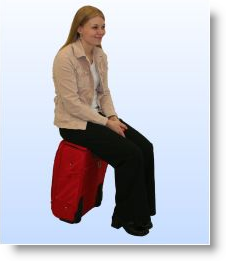 I found out that a local company (they're based in Oregon area where I live) has decided to change all that. The company is "SeatKase" and they are making some nice, carry-on sized luggage with a fold-out seat that you can sit on. SeatKase luggage has been tested to hold up to 250 pounds, so it's really tough stuff.
 SeatKase uses a patent pending design for the wheels that make them stop rolling when you sit on the luggage so you don't end up sitting on the floor. The luggage is also designed to make it easy to create a laptop stand so you can couple the luggage with any chair that's handy and create an office on demand.
On the SeatKase site, you'll find data on the wheel locking mechanism, as well as ordering and pricing information (the bags are $99 US - a great price for something that looks to be very well made).
I haven't seen one of these in person yet, but this seems like a great idea for road warriors.
Related items
Read MoreWhen it's ajaxWindows, of course. OK, maybe that doesn't make sense to you yet - but it will when you check out ajaxWindows.
 This is an interesting concept - using AJAX and your browser (IE or Firefox), ajaxWindows allows you to use a very impressive desktop, complete with web-based office apps. The data you create (documents, sketches, presentations, etc.) are stored in an interesting way - inside a Google GMail account.
You can also browse and use files from your local file system, such as when you want to paste graphics, text, etc. into ajaxWindows. There is also a sync tool to keep music, docs, etc. synchronized between your virtual desktop and your physical computer, should you desire to keep them synchronized. Of course, you can also use Google Docs to share things across multiple locations but that's certainly not unique to ajaxWindows.
Why would you use ajaxWindows? Well, it's free, functional, and it allows you to have the same desktop (complete with all your documents) from any high-speed internet connection in the world. This is an interesting take on remote desktop access, and I bet it will be a significant game-changer in the future.
You can sign up for a free account, or try it out in a non-persistent trial mode. I'd describe it as "not yet ready for prime time" -- for example, I could never successfully add an image to the presentation you see in the screenshot above -- but it's still worth a visit just to see how cool it is.
Related items:
Read MoreIf you're like me, the number of "social networking" invitations you receive seems endless (I'm a long-time LinkedIn user, but have been invited to join Facebook, Quechup, Xing, and a ton of others). While it's nice to be asked, I haven't been joining all of these other networks because I don't feel that I have the cycles to be a good citizen in too many of these communities.
 I've just been introduced to a cool new service called SameCell that adds a new twist to social networking -- and it requires very little process overhead from me. SameCell is designed to let you know when you are near one of the "buddies" in your list to make it easy for you to connect with each other for coffee or whatever. The service is currently Blackberry-centric, with plans to move to many other smartphone platforms in the near future.
As the name implies, SameCell monitors which "cell" of wireless coverage you're currently in, and checks to see if one of the people in your list is in the same cell or an adjacent cell. For each contact in your list, you can set a proximity range (in miles) so that you will be alerted any time that person comes within the specified range.
The software is free and easy to install (if you want to install, just point your browser at http://www.samecell.com/setup from your Blackberry). Once the software is installed, you activate your free account, then you can easily add or invite others to your buddy list - SameCell integrated directly with your device address book.
There is a bunch more information on the SameCell site, including videos explaining more about how it works, answers to questions about privacy, etc. There is also a link on the home page to get on the list to be notified when versions for other phones are available.
Who knows - maybe I'll see you on SameCell the next time we're in the same airport!
Related items:
Read MoreMany of us work in places that use quarterly objectives (aka MBO's, or Management By Objectives). These are typically a list of 3-5 "targets" to be achieved within a given quarter. They are a great tool for guiding focus and prioritization, and provide a means to review how well you did at the end of the quarter.
 Why not move to an MBO-like model for your personal development? It's easy - at the beginning of a quarter, get into the habit of stepping back and contemplating what you want to get done during the next quarter.
Here are some tips and tricks to increase the effectiveness of this approach:
- Keep the list short - 3 to 5 objectives are about right.
- Write down your personal MBO's using the "SMART" formula:
- Specific - make sure you are very clear and explicit about what you want to achieve (practice your outcome-centric visualization.
- Measurable - make sure there is a way (preferrably objective, and not subjective) to measure your progress and success.
- Achievable - Are the objectives ones that you can actually attain?
- Realistic - Dreaming is great, but do you have the ability and resources to succeed?
- Time-bound -have you set a target date by when you will achieve the outcome?
- Review your objectives regularly (some people like to hang the list near their desk. I've also heard of people who keep a copy of their list on the mirror in their bathroom so they see it every morning when they get ready.
- At the end of the quarter, review and rate your outcomes. Also reflect on what you've learned along the way.
I'd love to hear whether you've every utilized a similar approach, and would like to hear any additional ideas you have to share.
Read More
