
Genuine Curiosity

Author Dwayne Melancon is always on the lookout for new things to learn. An ecclectic collection of postings on personal productivity, travel, good books, gadgets, leadership & management, and many other things.


Eluma: Browse, organize, and share

I do a lot of online research on a variety of topics - work, personal, etc. However, I'm not very methodical about cataloging the links I find. As a result, I have a lot of unruly bookmarks (favorites) that I've accumulated. I save some of them "just in case," others I intend to check periodically (but often forget), and still others were bookmarked for a short term need but they hang around even though I'll probably never click on them again (tracking pages for orders, for example).

I recently found a tool that seems to be helpful in taming these bookmarks while making it easier to organize and share the "finds" I unearth while online. The tool is called "Eluma," and it's free.

Organize as you browse

Eluma makes it easy to flag, file, rate, subscribe, tag, and "compartmentalize" the sites and pages I discover, by providing a user-friendly toolbar.

Additionally, you can attach notes to a page for later reference.

From a higher level organizational perspective, you can organize your information sources in a number of ways - by source type, by topic / category, you can use tags, and you can create your own Collections. The Collections aspect is very useful - more on that later.

Track and get reminders

I follow a lot of topics - some by looking at web pages, some by subscribing to RSS feeds, some through searches, etc. The challenge is remembering to look at all these things so I don't miss something I'm interested in. I have solved some of this by using things like Google news alerts and that sort of thing, but the problem is that I still have a number of things to check - email alerts, an RSS reader, manual perusal, etc.

Eluma makes it easier to bring all of these different sources together (plus a few more) and set up customized searches and alerts so I am notified when something new comes about in one of the sources I'm monitoring. I've only been using Eluma for a few weeks, but the aggregation and alerting features have already saved me some time.
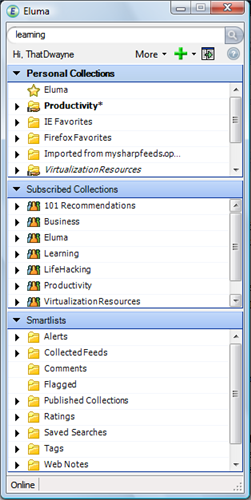
Read about the topics you're following

In this area, Eluma is quite a bit like any other reader - you click on the source you want to read, and it presents you with the latest information from that source. It will track what you've read, what you haven't, and you can configure the time horizon to tell Eluma how long to keep the news items.

One thing that is nice - it collapses into a "mini" mode, which reminds me of an IM client (see screen grab of the window, at right). When you click on a topic, it creates a "sidecar" windows that contains the content associated with what you clicked on. This is a nice compromise of using minimal screen real estate when you're not actively using Eluma, but expanding to give you lots of on-screen data when you are using it.

As I've mentioned in the past, one of the criteria for a suitable feed reader for me is that it must handle offline reading so I can catch up on my feeds when I am on a plane. I'm happy to say that Eluma handles this pretty well, and I've been in touch with their developers and they have plans to make this offline functionality even more robust and flexible in the future. The added functionality will allow you to flag a feed for special treatment so that Eluma will not only cache the feed content, but will cach a certain depth of links beyind the feed items, as well.

Share what you've found

One of the cool aspects of Eluma is that it is associated with a sort of "community" of other Eluma users. As you find interesting items and information sources, you can rate them and share your ratings with the rest of the community. This can help separate the wheat from the chaff when you're diving into a new topic, and tap into the power of the community.

I mentioned Collections earlier. This is a notion that allows you to create predefined "groups," filters, and profiles of information sources. You can, of course, use these to help you organize your information flow, but you can also publish these to others - either the whole community, or to individuals you invite to share them. This is pretty nice - I'm just getting into them, but I think this could be one of the power features of Eluma, transforming it from an organizational tool to a collaboration tool.

Way more than I can cover here

My summary here is just scratching the surface - Eluma is a very feature-rich and flexible tool. It's free to try, and I rcommend it if you're someone who likes to follow a lot of online information and are tired of turning to a huge number of tools to get the job done. Find out more at Eluma's web site.

Read More

Juicy apple bites: Mac and iPhone scoop

I have a couple of interesting, Apple-related tidbits to share with you - and they might be interesting whether you use a Mac or not.

  • First, Mozy has released a Mac version of their online backup product (see my earlier review of Mozy, which I use at home). In honor of this new release, they are offering a discount on new signups through May 8. Simply enter the promo code "MACMOZY" for a 15% discount, whether you use a Mac or not - a pretty sweet deal.
    • After May 8, you can also use the May monthly promo codes: "MAY" is the 10% off promo code for annual signups and "MAY2" for 10% off biannual signups.
  • Second, I have been Jonesing for an iPhone, but have decided to wait until later this year when they release a 3G iPhone. Since I'm chomping at the bit to get one, I sometimes dig around the internet for hints about features, pricing, etc. In the course of a search today, I ran across some really interesting reading on Apple's strategy around the iPhone, MacBook Air, and other products. This comes to us by way of an AppleInsider-posted Piper Jaffray analysis of Apple's 15 unanswered questions about Apple's product strategy. This is just excellent work (the iPhone stuff starts on page 2).
Read More

Tools for connecting in business

I've been a little quiet this week due to a hectic schedule, but wanted to let you know that I posted about LinkedIn and Plaxo on the Joyful Jubilant Learning blog yesterday. If you haven't already seen it, and are interested in tools that can help you with your business and (to some degree) social connections, check out the post.

I have a backlog of book reviews to be written - look for them to start showing up in the next few days, carrying through to next week.

Read More

[Review]: Discovering Your Inner Samurai

I'm privileged to be a part of the Virtual Book Tour for Dr. Susan L. Reid's book, "Discovering Your Inner Samurai: The Entrepreneurial Woman's Journey to Business Success1." This book is an interesting business book in that it grapples with a tremendous array of topics, all designed to help women conquer the trepidation, disillusionment, and other obstacles that must be overcome by a successful woman entrepreneur (referred to as a "Pren-Her" by Dr. Reid).

Now, a lot of the obstacles discussed in this book are the sorts of things that entrepreneurs of any gender can encounter, so there is tremendous advice here for any aspiring entrepreneur - not just Pren-Hers. However, Dr. Reid weaves in some powerful advice tailored to the "styles" and needs of women, exploring differences in bonding and communication styles, and the advantages of women's ability (and willingness) to "go deeper" into the emotional realm of business. For example, there is a chapter on "Womaning - Woman As A Verb" that I really enjoyed - it's a great exploration of how women build relationships. For such a short section in the book, it sure helped expand my perspective.

Keeping it real

Like most books that really "connect" with me, this book is full of wonderful stories of real life experiences. Dr. Reid talks a lot about her own journey through business and life (don't miss the early chapter describing her spiritual awakening). It's through these stories that she teaches us to connect with our "Inner Samurai" -- the voice in our heads that gives good advice and helps you remain centered in the heat of battle. She also teaches us to be more aware of this good voice, since it can easily be drowned out by our less helpful voices.

"Why do we think our thoughts are the truth? Because we form attachments to our thoughts. Instead of listening to our Inner Samurai, we form attachments to what the voice inside our head is telling us. When that happens, we're lost -- lost to focusing on past failures or future dividends instead of present joys. Lost to what really matters in life. We dwell within the domain of ego believing it to be real."
Read More

What’s gonna work? (Teamwork!)

One of my daughters watches a show called "WonderPets." She loves it - and I like it a lot, too. One thing I like is a consistent theme: Teamwork helps you solve problems (there is even a catchy song about Teamwork - see link at end of this post) that I can't get out of my head).

In the real world, one of the tricky things about teamwork (particularly if you have distributed or remote teams) is keeping everyone "on task" and on the same page about joint projects. I recently heard from some folks who are doing something about that, in the form of a web-based tool called "TaskBin." I've tried other collaboration / group project approaches, but this one seems awesome so far.

Dirt simple (but elegant in its simplicity...)

One of the things I like about TaskBin so far is it simplicity. And yet, it's very powerful. Some highlights:

  • It is really easy in all aspects. Easy to use, easy to maintain, and easy to invite others to your project.
  • All the tasks in the project are visible to everyone else, and ownership is clear.
  • TaskBin handles time zone translation for you - very transparently.
  • It's really easy to add and update tasks.
  • There is a private "Notepad" area to capture thoughts you haven't decide to act on yet.
  • You can make others administrators, so you can have multiple project owners share responsibility.
  • You can subscribe to updates via RSS, or get email updates.
  • You can view and update task status on mobile devices (as well as receive notifications that way).

I'm sure there is more, but I'm still a newbie.

Don't pin me down...

Another interesting thing (that seems to fit well with my team's psyche) is the vaguely specific time frames you can assign to a task. Rather than a specific date, it seems much easier to assign TaskBin's due "time frames" - Today, Tomorrow, This Week, or Sometime Soon. Very liberating.

As free as you want it to be

TaskBin is currently in Beta, so it's all free. When they become a production product, you'll have two models to choose from:

  1. Cost-free - an ad-supported, no cost model.
  2. Ad-free - no ads, but you pay for service.
So, what are you waiting for? You can start a free TaskBin project in about 2 minutes from their home page. If you're not ready to take the plunge, at least test out their demo TaskBin group.

Teamwork Song:
Read More