Author Dwayne Melancon is always on the lookout for new things to learn. An ecclectic collection of postings on personal productivity, travel, good books, gadgets, leadership & management, and many other things.
I usually stay at one or more hotels a week in the course of my work (I was in three last week, for example - one in Vancouver, BC; one in Columbus, Ohio; and another in St. Louis, Missouri).
In these hotels, I've experienced a wide range of comfort, hospitality, amenities, etc...but I've never had a haunted hotel room.
Here is a link to a spooky one, which I found on one of my favorite hotel sites, HotelChatter.com. They posted a great snippet on the Stanley Hotel in Colorado, which is supposed to have been the inspiration for Stephen King's "The Shining."
You may have noticed that I've switched to a basic, traditional blog format/layout this week. After a few comments about my type being too small, my sidebars being a bit busy, etc. I decided I'd use a standard Typepad layout with just a few minor tweaks. Most notably, I'm still using my custom banner featuring little snippets of interesting things I've seen in my travels (the current one is from a snapshot of the Clifton suspension bridge in Bristol, UK - it is beautiful - click the tiny photo for a larger view of the photo I pulled it from).
If you've been challenged by my historically small fonts, I hope this helps. By the way, you can adjust the text on your browser to make the font larger or smaller if you'd like. Of course, that is a global change - not a site-by-site adjustment.
So - the new layout: Love it? Hate it? Couldn't care less? If you have strong feelings about it, let me know. I may not act on your opinion, but I surely won't act on it if you keep it to your self.
By the way - thanks for dropping by and sharing your thoughts. It means a lot to me (even though my posting schedule is about as predictable as the weather).
Maybe the political season in the US has perked up my ears about this, but I've been noticing some indirect or less-than-committed responses from people in meetings lately.
Here's how it goes: you put forth an opinion or propose a decision, and someone else gives you a response that makes it sound kind of like they agree, but it just leaves you wanting. In other words, I'm looking for an "I agree," or "Absolutely," -- even a "No way, that's not even close" -- so that I can get to a definitive outcome. Instead, I get something squirrely and only "semi-committal."
Some of the ones that bug me are:
"I don't disagree."
I've challenged this with, "OK, then - so you agree?" - I often get a "No" in response. This seems to be a way to avoid conflict, but it can mislead people into thinking you agree when you don't yet.
"I would agree with you."
OK, so do you agree? Or is this yet another conflict avoider? I suppose I should test this one next time I hear it (I've heard it quite a bit, recently).
For a healthy, productive discussion, I think it works better if people stay away from squirrely kinds of statements. Have you run across any others like this?
Here are some clearer alternatives:
"I'm not convinced yet - let's discuss it some more."
"I'm almost there - if we could solve ____, I think I could support this."
Of course, I recognize that it's sometimes necessary to get a little squirrely. I used to work for a guy that would never give up arguing (not debating - this was arguing) until he felt he'd won. I came up with the statement below, which seemed to work to end the argument. Practice saying this in a positive-sounding tone, and it can get you out of dogmatic, one-sided blah-blah's with folks who won't quit 'til they win.
My stealthy (and very squirrely) statement is:
"Well, I certainly can't fail to disagree with you there! Well done."
Work through the double negatives and see what I'm actually saying. My sympathies if you ever need to use this one to stop a nutty argument.
This is interesting, and why shouldn't we do it? After all, China should have 5 time zones and they use a single zone, so wouldn't it work for us?
The article talks about TV schedule impacts, etc. but I've thought of a few other interesting challenges with this notion:
Whose time zone would we pick? You just think political battles are messy now, wait til you have the populous states of California and New York battling it out over time zones!
How would this impact air travel? I travel a lot and rely on the time zone differences across the US to get meetings in on the east coast and still make it home before everyone's asleep in Oregon. I also use redeye flights sometimes and count on my ability to "play the zones" to fit more in and minimize time away from home. This would put a crimp in that, for sure.
What do you think? I don't think this'll happen any time soon (if ever) but it's fun to ponder. So click on the image below to see the full text and ponder away...
One of the coolest aspects of the Getting Things Done (GTD) "vibe" is that you can (and should) tweak the system to fit how you live, think, and work. As I've shared in my last few chapters of my Odyssey, that isn't always easy. Knowing something is broken is not the same as knowing how to fix it.
A quick recap of my condition:
My main symptoms, as you may recall, were:
I hadn't been able to develop a workflow that turned "management of my context lists" into a predictable habit;
Which resulted in ever-growing, stagnant lists;
Which meant that things got lost in my "trusted system;"
Which drove me to leave more things in my inbox so I wouldn't lose track of them;
Which led me to distrust my system.
The opposite of hilarity ensued.
My newfound nuggets of hope included ClearContext (which helped me gain an upper hand on email and task management in Outlook), and "Total Workday Control" (which helped me with a new approach to list and task managment).
My prescription: A hybrid approach to GTD
I won't cover everything about GTD here -- you can read the book for that -- but I will recap the things I'm using intact, then the things I've tweaked to fix the things that didn't work for me.
The keepers - things I'm doing "by the book" are:
The "Next Action" approach
The 2-minute rule
The Collection habit (recording thoughts and actions as soon as possible after they enter my head)
GTD's approach to topic-based filing (physical and virtual)
But I don't use paper Tickler files - I travel too much and am too "virtual" for that to work for me.
Focusing on getting In to empty, and using David's processing workflow (the diagram in the book) to get there
Using traveling GTD folders: A red Inbox one, a blue Read & Review, and project support folders
Actively extracting the "embedded actions" from my captured notes and getting them into action list
Keeping my "hard landscape" and nothing else on my calendar
GTD's method of project planning (tracking is covered below)
That's not to say I do these perfectly all the time (I am still much better at work-related stuff than I am at home-related stuff, for example), but I haven't made significant changes to these aspects of GTD.
My hacks - the things I've tweaked or added include:
Hack
Description
I've added more traveling folders
I've added a folder called "Supplies" that has stamps, envelopes, thank-you notes, Post-It's, and other things that are handy when traveling on the road.
I've also added one called "Shred" so I can put sensitive things in there after processing my folders on the road. Sometimes I don't have a trash can handy, so I sometimes use this as a trash folder, as well. I used to have a separate Trash folder, but I decided to trim things down by sticking with "Shred" only.
I use TWC's method for managing tasks, which has led to modified Weekly Review behavior
This includes using the Total Workday Control (TWC) views I described in Part 3, which were installed automatically by the TWC edition of ClearContext (see my review of ClearContex in Part 2 for how you can get a discount by using my referral code).
Here's how this works for me:
Each morning, I go through my "Today" list - my TaskPad dashboard that shows up on my Calendar screen in Outlook (one of the TWC views).
As I discussed in my TWC post, this view shows all the things I wanted to be reminded of as candidates to work on that day. It also shows things left over from previous days.
I go through the list and decide whether I can realistically get each item done that day (i.e. do I have the time, am I in the right place, do I have the gumption, etc.)
If it's still an appropriate target for the day, it stays there. If not, I either remove the date, delete the task, or set it's Outlook "Due Date" for a future date.
note - setting a future due date makes it disappear again into my (now trusted) system
Most mornings, I make a sweep through my Daily and Master Task Lists (also TWC views), and review each item to see if there are any items I want to...
bring forward to today,
assign a "start bugging me" date to by putting a date in Outlook's Due Date field
Remember - in TWC, "true" due dates are noted in the subject line of the next action - Outlook's "Due Date" field is just when you want the item to start showing up on your Today dashboard view
This workflow means I really am working my lists all the time so I now feel I can trust them. It also means I am doing a sort of "mini Weekly Review" every few days.
I am now scheduling a formal Weekly Review every week or so, and have been doing it. The difference is that I use this formal Weekly Review time to do a full GTD Mindsweep, and analyze all of the things on my list to make sure they are really actionable, look for any stalled projects, and things like that.
I believe this is the most significant change I've made, and is the thing that was missing from GTD for me. Even though it means buying yet another book, I really recommend that you pick up a copy of TWC even if it's only to see Linenberger's kung fu for managing tasks.
I use TWC's method of noting Projects, Goals, and Mini-projects in my task list
I still use the GTD mindset for thinking about projects, but GTD isn't prescriptive enough for me about how to track them in your system. I've seen other tracking systems on blogs that seemed cool, but I ended up either abandoning them or was afraid to try them because they were too complicated.
TWC includes a very easy technique for flagging / tracking projects and goals in Outlook. Basically, you create a nomenclature (starting with a "P" for Project) and use it to record all your projects in your system. If I have a project about remodeling my kitchen, for example, I might create a project task called "P - Kitchen - The kitchen is updated, has more usable storage, and we love how it looks."
Then, I decide on the Next Action (or even more than one possible Next Action) and I use the project name ("Kitchen" in this case) in the Next Action text. For example, a Next Action of this project might be, "Kitchen - Discuss budget and time frame with Kathleen."
This makes it easy to tell which items are projects, and which ones are related to those projects. Pretty simple. And there is some great material in the book on "Mini-projects," as well.
For Goals, I simply write them with a G at the beginning, like "G - Exercise - I exercise for at least an hour, 3 times per week." I then create Next Actions relating to this goal, using a notation method similar to that used for projects.
Different way of using Context lists
I don't assign Contexts for everything the way I originally did when I started with GTD. That said, I still use a few pretty consistently (using the Categories field in Outlook). The only Contexts I use these days are:
@Calls @Computer - Web (mostly research items, prefaced with "RD" which is shorthand for "look into")@Computer@<name> @Waiting for Errands (for some reason, I've never used an @ sign here) Ideas @Blog @<city>
Why do I use these?
They help me answer a couple of important questions during my Task reviews.
What calls do I still want to make? (@Calls)
What things do I want to research? (@Computer and @Computer - Web)
What errands do I need to run? (Errands)
They help me track open loops (@Waiting For)
One cool thing about using TWC's "Today" dashboard approach: I can use the @Waiting For list like a tickler file by assigning a Due Date to an @Waiting For item so it will show up in a week or two so I can check back in on the status of the item.
They give me buckets to put things in for 1:1 meetings with other people (@<name>)
For example, when I sit down with Gene, I check to see if anything is on my @Gene list - those help build my part of the agenda.
I also put person-specific "@Waiting For" items on their named list.
They help me quickly find and review any crazy ideas I may have recorded (these don't have to be written in Next Action form) (Ideas)
They provide a discrete bucket for specialized topics.
@Blog is for blog post ideas and random thoughts that may find their way here
@<city> is a place for those "Next time I go to that city, I want to do this / see this person / stay at this hotel" and things like that.
I no longer feel pressure to put everything in a category-specific context list.
I use ClearContext to manage my Outlook inbox
I've already discussed this in "My GTD Odyssey" and it is a key element in my ability to get my inbox to empty every day for the past month.
Actually, there were two days I didn't - last weekend when I was on a Boy Scout campout all weekend. But I used my newfound techniques to get back to zero first thing Monday morning. It was a piece of cake.
When you combine the email filing leverage of ClearContext with my ability to trust that items tossed into my Task lists will actually get read, I'm easily 10x faster at dealing with items in my inbox now.
All this makes it seem sooooo much easier and less stressful to clear my inbox these days.
The foundational principles
Whether you use Outlook or not; whether you use ClearContext or not; whether you use TWC or not, there are certain foundational principles I've learned that I think you can apply or develop from my experience. Here are some thoughts about what they are:
If GTD is not working for you, don't throw the baby out with the bath water. Try to separate it into the components that are working and those which are not. This "divide and conquer" at least helps you identify which things you'd like to keep and helps focus on finding better ways to fix the things that are broken.
Beware of the "magic tool" trap. If you have a process problem, you need to find a better process to fix it.
If your Task lists are growing longer, going stagnant, etc. and you don't trust yourself to manage the items they contain, that's a process problem. You need to find or develop a workflow that forces you to look at them methodically. For me, that method seems to be what I found in Total Workday Control (TWC).
If you do want to find a tool to help you with a particular aspect of your life, look for one that simplifies your process rather than making it more complex (for example, I found that ClearContext enabled me to achieve a more precise and far more efficient flow for topic filing of messages in my email inbox).
Look for others' solutions, and find a community of practice that you can learn from and share information with - GTD is very tweakable / hackable, and I'm finding that others' tweaks and hacks are helping me immensely.
The sites featured in the "Productivity" and "Work, Life, and Management" categories in my blogroll are places I often find inspiring and helpful tips & tricks.
For tools and technology related to personal productivity, check out the "Technology" category on my blogroll.
My GTD Odyssey will continue
So, that's the story so far. As a lifelong learner, I know that this journey is not over. I hope you benefit from my thoughts at this point, and I will continue to share as I continue to learn.
And I would love to hear from you with any questions, tips, tricks, and useful things you find on your own journey.
Copyright 2005-2015 Dwayne A. Melancon, all rights reserved.
Licensed under Creative Commons - see the "About the Author" page for details.



 Some of the ones that bug me are: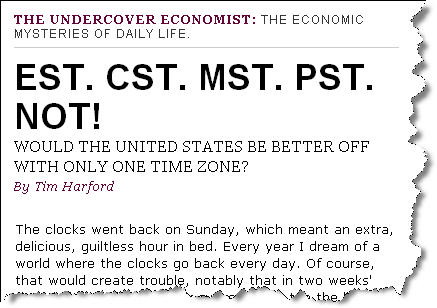
 My main symptoms, as you may recall, were:
 Whether you use Outlook or not; whether you use ClearContext or not; whether you use TWC or not, there are certain foundational principles I've learned that I think you can apply or develop from my experience. Here are some thoughts about what they are: