Genuine Curiosity

Author Dwayne Melancon is always on the lookout for new things to learn. An ecclectic collection of postings on personal productivity, travel, good books, gadgets, leadership & management, and many other things.


Learning to be ‘easy to talk to’

Ok, so you thought I was going to talk about packing, right? That's coming...but first:

This evening, I was spending a few minutes catching up on the blogs to which I subscribe -- which is something I haven't had the cycles to do lately, and it is really good climb back in. One article that grabbed me is Rosa's post on Joyful Jubilant Learning, called "Learning to Talk to Each Other."

You see, Rosa is one of the people that really got me to talk to other people in "blog world" a couple of years ago, and has been a beacon for me for how to get meaningful dialog to happen. Through her blog, appropriately titled "Talking Story," Rosa writes a lot of stuff, and reaches a lot of people. But she also listens, connects dots, and "refactors" things to make them better -- that is her real gift. Some examples I've seen:

The magic happens because Rosa is easy to talk to, and that's because she really listens and shares relevant experiences with people. She gives herself to the conversation in a way that gives you the impression that she's really paying attention, not trying to think about what she's going to say next or what she's going to do after the conversation is over.

Oh - and did I mention that I consider Rosa to be one of my best friends, even though I've never met her face-to-face, and we've only spoken live once? I don't know how she does it, but she has a knack for reaching out to me at just the right time, with something I didn't realize I needed.

One day, I hope to become as good at connecting with people as Rosa.


Related items

Read More

Packing tips, part 1

Lots of travel these past 10 days - I spent a few days in Prague, came home to Portland for about 12 hours, then spent the long weekend (Memorial Day in the US) in Louisiana. In both Prague and Baton Rouge, I found myself in the midst of many discussions about packing for travel - how to pack without wrinkling your clothes, how to fit everything into a carry-on instead of a checked bag, etc.

Since travel-related posts get a lot of traffic on this site, I thought I'd share some of the tips I've learned or heard from others. I'd also like to hear your packing tips, terrors, and the like.

Packing without wrinkles

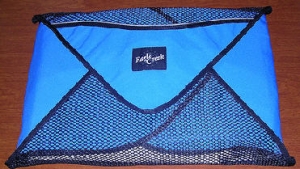
It all started back in 2005 with my post about my passion for the Eagle Creek Pack-It Folders. I still use these and they are far better than anything I've seen at helping me look neat and tidy on my many business trips. You can see pictures of how I use them in my post at LifeHack.org.

Verdict: Eagle Creek Pack-It Folders are among my business travel essentials, and I use them for vacation travel as well.

Roll or fold?

In discussions about packing, the question about Rolling clothes usually comes up. I have found Rolling to be inadequate for my professional outerwear. I use rolling only for underwear, casual t-shirts, and things like that. Rolling is also acceptable for things like Boy Scout campouts where your clothes don't need to look crisp and unwrinkled. The main advantages of Rolling is space efficiency and the fact that you don't need any special gear, while the main disadvantage is its tendency to produce very noticeable creases if you don't roll things perfectly.

Verdict: Rolling is good for casual clothing, underwear, undershirts, etc.

Best of both worlds

Mixing these two techniques can be very effective - use the Pack-It Folders for dress shirts and pants (though pants can also be folded and laid flat in the suitcase with little risk of ugly wrinkles), and roll your other clothing so you can tuck the little rolls in around the Pack-It Folders so you don't waste any space.

Short list of recommendations for packing without wrinkles:

  • Use Eagle Creek Pack-It Folders for your dress clothes or other clothes for which a neat, smooth appearance is important.
    • By the way - you don't need one Pack-It Folder per shirt - I typically get between 5 and 8 shirts to fit in one of these - you fold and stack them inside the folder, then use the Velcro-secured flaps to hold them together.
  • Roll your underclothing and casual clothes, allowing you to fill in space around the Pack-It folders to get the best use of the space in your suitcase.
  • Give your clothes a fighting chance by buying wrinkle-resistant, easy care, or no-iron dress clothes. I love Lands End's no-iron clothes, and Nordstrom's SmartCare line for men.

More packing tips on the way - stay tuned! And please share your own tips.

Read More

Want to share my personal assistant?

OK, this is so cool. I want to tell you about a very specific type of personal assistant: its name is Yapta, which stands for "Your Amazing Personal Travel Assistant."

I've been using this as part of the company's private Beta for the past couple of months, and they have now moved into a public Beta, and I can talk about it. As you know, there are lots of good services out there to help you shop for good prices on airfare. Yapta is the first system I've ever seen that track prices even AFTER tickets have been purchased and alerts you when you are eligible for a travel voucher or cash rebate from the airline!

You see, most airlines have policies that allow you to get money back if the price of airfare drops after you purchase a ticket. Yapta will watch the fares, let you know if the price drops, and helps you get a travel voucher to get obtain travel vouchers - and in some cases, cash refunds - when the price decreases on tickets that have already been purchased. They make it very simple to start watching a trip you've already purchased - you simply enter the airline, the confirmation code, the price you paid, and your last name and it fetches all the details and starts tracking. In the past 3 months of private Beta testing, Yapta alerted its 275 test users to approximately $30,000 in eligible savings and refunds, for an average net benefit of $109 per traveler.

The other thing that is cool is their browser add-on that lets you tag trips you are watching and let you know if the price goes down. For example, from the Expedia site, I tagged a few different routes (clicking on the "Tag it with yapta" button) on a few different airlines for a trip I want to take next Christmas. Now I am watching them to see if any bargains crop up. Today, they track a respectable list of airlines, and I imagine the list will grow as time goes by.

This is a game changer, folks. Be sure and check it out - and sign up for your own account. It is free, by the way!

Read More

Can you watch your legally purchased DVD’s on your video iPod?

I have quite a few DVD's in my collection that my wife has little interest in watching (usually because they are a bit violent or intense - like my 24, Donnie Brasco, Highlander, etc). I also have a video iPod , and I decided that I wanted to have the option of watching my videos on long flights, in addition to the audiobooks I listen to.
One option, of course, is to buy video content through iTunes - and I've certainly done that a few times. However, I already own copies of these movies so why should I have to pay twice just to see them on my little iPod screen?

Access denied!

There are several problems that prevent me from just copying these videos to my iPod:

  • iTunes is not capable of ripping DVD's the way it rips CD's
  • most commercial DVD's are encrypted with CSS (Content Scrambling System) so my (also legally purchased) copy of Nero 7 Ultra Edition will not rip them
  • the copy protection laws under the Digital Millennium Copyright Act (DMCA) make it illegal to circumvent CSS

Let the research begin!

How fair is Fair Use?

I understand that the DMCA exists to protect content producers / owners, and I agree that stealing videos or music is unethical. However, under "Fair Use," consumers are allowed to make a backup copy of a CD or DVD and can store the original and watch the backup. This is no different from copying the DVD to your iPod, putting the original away and watching the backup that's stored on your iPod.

The problem is that the DMCA makes it illegal to circumvent the CSS encryption used on the DVD's, so you cannot make unencrypted copies of the content. This effectively prohibits you from watching your licensed video on one of the video devices you own, and seems a little ludicrous to me.

Nonetheless, the motion picture industry is taking a hard line to try to prevent consumers from watching their CSS-protected DVD's anywhere else. Only changes in legislation will make this any better, so if you're in the US and you don't like this Draconian approach, contact your representative in Congress and let them know how you feel about this.

What are the options?

The only means allowable under the DMCA is, apparently, to take your DVD's with you and watch them on a laptop or DVD player.

What about transferring your DVD to the iPod? If it's CSS-encrypted, your legal option is to purchase the content in iTunes (assuming it's available there).

I'll also share that, in doing some research via Google, I found that there are some free device drivers (try searching for DVD43, for example) that (on Windows XP at least) claim to allow you to use your DVD ripping software on commercial DVD's. From there, it should be a simple matter of using your ripping software to convert the video to MP4 format on your hard drive, adding the movie to iTunes, and synching it to your iPod. By the way - I also noticed that Nero Recode (a module included as part of Nero 7 Ultra Edition) has a preset for output to iPod compatible video.

If this approach works (remember, never rip anything you haven't paid for and don't share them with anyone else!) you will be able to use your iPod to watch your own DVD collection on the road.


Related items

Read More

[Review] Lead Well and Prosper

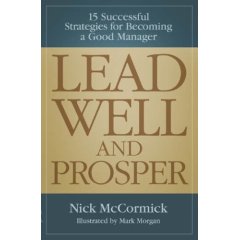
Last week, I read Nick McCormick's book "Lead Well and Prosper: 15 Successful Strategies for Becoming a Good Manager." At under 100 pages in length, it was a quick read. Short though it is, I was pleasantly surprised by the concepts McCormick presents in the book.

This book struck me as a sort of "Cliff's Notes" for management and I think it provides a great reference resource, particularly for new managers who aspire to develop their leadership skills. In fact, I can see this as a very useful handout for companies that conduct any kind of new manager training.

Each of the book's 15 chapters deals with a fundamental technique or concept, often using hypothetical dialog (featuring recurring characters, some humor, and fun graphics) to illustrate the point. At the close of each chapter, there is a summary that includes Do's, Don'ts, and Actions to provide guidance for developing or improving your personal skills.

As I was reading the book I thought, "It might be cool to focus on one chapter a week to go through a cyclical improvement process." Then, lo and behold, I got to Appendix D where McCormick provides an action plan to develop your very own "Development Plan" complete with quarterly targets. Appendix E complements this with a tutorial on planning your week and weaving elements of your Development Plan into your weekly activities.

Oh - and be sure to take the "Am I A Good Manager?" test in Appendix F!


Related resources

Read More
Related Posts Plugin for WordPress, Blogger...