
Genuine Curiosity

Author Dwayne Melancon is always on the lookout for new things to learn. An ecclectic collection of postings on personal productivity, travel, good books, gadgets, leadership & management, and many other things.


Focus on your top three

When life gets busy (or my curiosity gene kicks in), it can be hard to focus on what's really important. As you've seen before (see "Related items" at the end of this post), I often turn to tools like PowerPoint and Mind Manager to make my life easier.

As for focusing on priorities, I have found that PowerPoint's "Smart Art" tools are particularly useful for creating a "Top 3 Focus Areas" list each month. On this one-page cue, I add my top 3 focus areas, and my top 3 desired outcomes for each. Essentially, these become my "must get done" items for the month.

I then print out the page, carry it around with me and make notes on the page to help track my progress, update my boss & peers, etc.

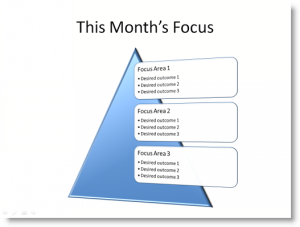
This is amazingly simple and very effective. I happen to use PowerPoint 2007, which has some snazzy templates (I often change them around just to make life more interesting - a couple of examples are shown here).

Give it a try, and see if it helps you focus.


Related items:

Read More

Superior airpower


When I boarded my plane this morning, I sat in my emergency exit row seat (next best thing to a First Class upgrade) I was pleasantly surprised to see that this plane, a Continental Boeing 737-800, has power outlets throughout the plane!
Of course, the plane *didn't* have video or audio on board, but I'll take a "bring your own" model with power any day. Now, if only they'd add these to every plane...
By the way, this also gave me an excuse to try out Typepad's mobile client for the iPhone to snap the phot and write this post. Pretty cool little app.

Read More

iPhone 3G battery life, part 2

Yesterday I wrote about how I extend my iPhone 3G's battery life (using Kensington's Mini Battery Extender and Charger for iPod and iPhone).

Iphonebattery_little Well, I've got another day under my belt with both the phone and this device, and have some additional thoughts:

  1. The battery on my iPhone 3G seems to last a bit longer each day, and was noticeably better today. Maybe it needs some "breaking in" through a few days of use, or something like that. I am assuming it will level out soon since it can't continue to get better forever, can it?
  2. I decided to try recharging my phone with the Kensington battery extender today, and I find that it will charge the phone very quickly - much quicker than I'd expected. In less than an hour, it brought my phone from approximately 25% charged to fully charged.

I still haven't fully tested its effect on talk time (i.e. live use of the Kensington battery as a power source while talking vs. just as a charger when I'm not using the phone) but I'm still quite pleased with this device as a way to keep the juice flowing in my iPhone 3G.


Technorati tags: , , , Del.icio.us tags: , , ,

Read More

My solution to iPhone 3G battery life

Well, I took the plunge on Saturday and moved from a Blackberry to an iPhone 3G. I am working on a more detailed review of the pros and cons of what I've done but, in the mean time, I wanted to let you know my solution to the shorter battery life of the iPhone 3G.

For the record, the battery life is "just OK" - it isn't abyssmal and, as PC World reports, the iPhone 3G's battery life is better than that of competing smart phones.

What's my solution? I bought Kensington's Mini Battery Extender and Charger for iPod and iPhone (available via Amazon and elegible for free 2nd day shipping for Amazon Prime members). I've only had it for a couple of days but I love it already. On a call-heavy day, I start to run out of juice on my iPhone by late afternoon / early evening. By plugging this battery extender into my phone I get a few more hours of talk or browsing time (I haven't had it long enough to give you definitive times, but it definitely lets me finish the rest of the day).

This battery extender plugs into the docking connector on the bottom of your iPhone (original or 3G, and it works with the iPod Touch, too). It is small enough to carry in my pocket which I did all day today, for example. When you attach it to your iPhone, it is small enough that you can still use your phone without feeling like a mutant and you can continue using your headphones since the iPhone's jack is on the top of the phone.

This battery comes with a retractable charging (but not syncing) cable which plugs into your USB port or iPod charger, and you can charge it alone or while it's attached to your iPhone (in which case both will be charged). The LED's on this battery are very useful. When you are charging it, the three blue LED's (on the left in the photo) indicate when the charge level has reached 20%, 60%, and 100%. The red LED (on the right in the photo) is lit during charging and during use with the phone, it begins blinking to let you know when you have less than 20% remaining.

As I said, I've got more coming about my iPhone conversion but this was just too exciting to wait.

Read More

“50+ Productivity Blogs...” list

Thanks to Dustin Wax for an excellent resource list on Lifehack.org, called "50+ Productivity Blogs You've Never Heard of Before (and about a dozen you probably have)". And double thanks for including me on the list (#18).

Though I was familiar with quite a few on the list, at least half of them are new to me - and after sampling about a dozen of them in the last 30 minutes, I like what I'm finding on his list.

Check it out and go exploring. You can also see Dustin's personal blog at dwax.org.

[Update: Dustin has just added an OPML file that you can import into your RSS reader that will automatically add 62 of the 65 named sites - talk about easy! Just scroll to the bottom of the list and look for the link to the OPML file]

Read More