Genuine Curiosity

Author Dwayne Melancon is always on the lookout for new things to learn. An ecclectic collection of postings on personal productivity, travel, good books, gadgets, leadership & management, and many other things.


Travel Tip: Receipt tracking

If you're a business traveler like me, you need to keep track of your business and travel receipts. For a long time my standard process was to put them in my "Inbox" folder so I could process receipts like a normal inbox item. This worked pretty well, but I found that I sometimes missed a few here and there. Why? Because I sometimes needed to turn in my receipts before I had a chance to process my physical inbox, so I'd shuffle through my inbox folder looking for receipts.

Recently, I've started using a very simple system that works for me:

  1. In my laptop bag, I maintain a folder labeled "Expenses" - it's my special purpose inbox, just for receipts.
  2. As I receive receipts, I just open up the zipper on my bag and slip the receipts into the folder.
  3. For things which I don't get receipts (like tips, bag check fees, or things I forgot to get a receipt for) I take out my Notetaker wallet and make a note on my notepad with the date, reason, and amount. I then tear the sheet out and put it in the Expenses folder.
  4. Each evening before I go to bed in my hotel room, I check my pockets and put any relevant receipts into the Expenses folder. I also check my Notetaker wallet to make sure I haven't forgotten to tear out a handwritten receipt.

This system seems to work pretty well for me. Like any system, it's only effective when used consistently, but I've gotten it to become a strong habit so I don't go around my system very often any more.

For electronic receipts, I have a few techniques I use:

  1. I try to keep my business travel expenses confined to a specific card, and use one where I can check recent transactions online. This is especially helpful for international expenses because I can determine what exchange rate I received when I purchase things in foreign currencies.
  2. When I receive emailed electronic receipts (like for Wi-Fi day passes) I create a task in Outlook to remind me to reprint them when I get back to the office.
  3. For web page-based receipts, I print them to a PDF and save them in a folder on my Windows desktop called "Print Me" (I file the PDF after I print it).

What about you other travelers out there? Any tried & true systems for you?


Related items:

Read More

It’s good, by Bolly

If you're looking for a good movie to watch - I highly recommend "Bride and Prejudice," which my wife and I happened upon the other night on one of our channel-surfing trawls. It's a Bollywood (India's Hollywood equivalent) film, and it takes the classic story of Jane Austen's "Pride and Prejudice," and recreates the story in modern-day India.

It is funny, touching, entertaining and there are some awesome dance scenes. You'll love it.


Related items:

  • IMDB: Bride and Prejudice
Read More
Related Posts Plugin for WordPress, Blogger...

Tuesday Tidbits - Useful Stuff for Professionals

A while back, I shared information on how to find a good plane seat. Now, I'd like to tell you about a way to do this on a smartphone, pda or other small screen device with internet connectivity. Just point your mobile browser to http://mobile.seatguru.com and select the airline and aircraft from the menu.

From there, you'll see some information about the aircraft configuration along with a color-coded seat map that will help you determine whether your seat is good, bad, or other. This is also helpful if you want to ask for specific seats either on the phone or while talking with the gate agent.

You can see an example of the seat chart in the picture at left (click the image if you want to see a bit larger view).

I love SeatGuru - and it's free, by the way.

Note: Some of you who've dropped by here for a while may notice that I'm no longer using a Treo; yep, my company switched to Blackberry in December.


Related items:

Read More

Fresh Gear: Faster filing - email style

I've been running the new version of Claritude Software's SpeedFiler, which is an Outlook add-in designed to streamline the way you file messages in Outlook.

If you ever use Outlook's [Ctrl]+[Shift]+[V] keystroke combo to move messages to filing folders, you know that it is a good habit to develop, but it requires a lot of steps if you use subfolders (the Outlook UI is a little clunky). I've been using this since I got hooked on David Allen's "Getting Things Done".

Outlook's clunky old filing

If, for example, I want to use the traditional Outlook UI to file a message in a folder called Inbox/Customers/Fictional, I have to:

  • type [Ctrl]+[Shift]+[V] to get the move dialog,
  • type "IN" to get to the Inbox folder,
  • hit the [Right] arrow to expand the subfolders under the Inbox,
  • type "Cust" to get to the Customers Folder,
  • hit the [Right] arrow to expand the subfolders under Customers,
  • type "Fict" to get the the Fictional folder,
  • hit [Enter] to save the message to that folder.

SpeedFiler's better way

SpeedFiler replaces Outlook's dialog for filing. To do the same thing with Speedfiler, I would:

  • type [Ctrl]+[Shift]+[V] to get the move dialog,
  • type "Fict" to get the the Fictional folder,
  • hit [Enter] to save the message to that folder.

Much easier, and a lot less hand movement.

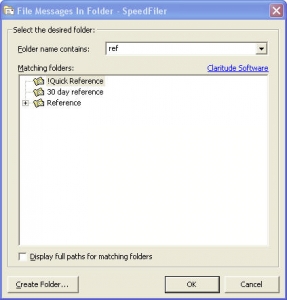
Another cool thing - if you have multiple folders with similar names, SpeedFiler narrows down the list as you type - you can see an example in the screenshot I snagged and posted here, in which I begin to narrow down my various "...reference..." folders.

Other tips and observations:

  • SpeedFiler helps with retrieval
    • One of the drawbacks of filing is that it gives you more folders to navigate through when you want to retrieve things. SpeedFiler helps there - their CEO, Itzy Sabo, turned me on to a very cool shortcut:
      • When you want to navigate to one of your folders, hit <Ctrl>+Y, and the SpeedFiler dialog pops up and you can start typing to narrow down the folder you want to go to. When you've typed enough, hit <Enter> and you're looking at your folder. Beats the heck out of mouse-based navigation.
    • By the way, Itzy's blog has some great productivity articles, as well.
  • SpeedFiler plays well with other children

OK, gadgetboy - what's the big deal?

As David Allen says in his book, filing needs to be easy or it won't get done consistently. SpeedFiler makes it easier to do mundane filing, therefore it is more likely you'll file things consistently.

If you're an Outlook user (using Getting Things Done or not), I recommend you give it a whirl and download the 30-day trial of SpeedFiler

Read More

Is blogging a waste of time?

Michael S. Hyatt says that some people question whether his blogging is a good use of his time.  After all, he's the CEO of a huge publishing company and he blogs on a corporate blog every day.  He doesn't think it's a waste of time (maybe it's just me, but it seems kinda natural for the head of a publishing company to publish every day...).  Anyway, I love his treatment of this topic - give it a read and see if you do, too.

So - I applied the question to myself:  "Is blogging a waste of time?"  Like anything in life, I think some people get a lot out of blogging, and others don't see how anyone could enjoy it. When I started blogging, I never thought I'd still be blogging 2 years later but here I am.  My first post was about "Finding your voice" and was inspired by Stephen Covey's book "The 8th Habit: From Effectiveness to Greatness."

I don't know what I was expecting to get out of blogging.  It started as an outlet for my creative energy and a place to direct some of the thoughts I have as an introvert who thinks a lot but doesn't say all that much.

It ended up connecting me to some Great people all over the world that I wouldn't have otherwise met - and some of them you have become true friends.  A waste of time?  No way.

Read More