[Update: the link I posted before (and yes, it was on the official Chad Vader site) didn't play correctly - these are updated to ones that play fine.]
As you may recall, I shared links to "Chad Vader: Night Shift Manager" in a recent post. For those of you who are now hooked on Chad Vader, don't forget to check out Episode 7.
If you haven't caught up on Chad's hijinks yet, check out the rest of the episodes first (for best results, watch them in order).
Related items:
- I feel a disturbance in the store... (3/10/2007)
Technorati:
chad vader,
fun,
humor Read MoreThis is a "Fresh Gear" post, but it also fits under "Travel Light" - it's all about a travel headset that's impressed me quite a bit. This one is called the Logitech Premium Mobile Headset, and I have been using it for about a month and just love it.
I'm a traveling dictater1 once again
Me, a dictater? No, I'm not a tyrant - I just use software to do dictation while I'm traveling.
Last year, I posted about how I use Dragon NaturallySpeaking (voice recognition software) to perform a number of tasks like creating speaker notes in presentations, responding to email, and even composing blog posts. I still do that, but I have not been traveling with my old headset since I wore it out (actually, I rolled a chair over the cord and sliced it so it got all staticy2).
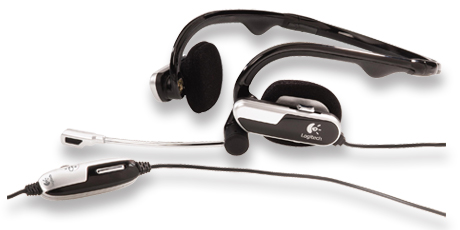
I was looking for a replacement and found the Logitech Premium Mobile Headset. Here are some of the highlights:
- This new headset folds up very flat and I can fit it easily into one of the inner pockets on my laptop bag
- It has adjustable earpads so it is very comfortable
- It includes an adapter so you can use it with USB or standard microphone/headset jacks
- It works with any voice-related software, such as NaturallySpeaking, Skype, and even voice-capable instant messaging clients
- It has inline controls for volume control and microphone muting
- The microphone sound quality is excellent (I'm using the USB interface, primarily)
- It has stereo sound so you can listen to music on it, should you wish to do so (and the sound is decent)
- Its the behind the head design keeps you from getting "headset hair"
- It also includes a carry case - however, I found the case to be too bulky for my needs
I'm very impressed with this one so far, and it has earned a place in my 'permanent checklist' for what goes in my laptop bag for every trip.
1 Yes, I know dictater isn't a real word. Some of my jokes are meant for me. Feel free to enjoy them with me, if you like.
2 I'm not sure "staticy" is a word to anyone but me, either.
Related items:
Read MoreNot sure if it's a keeper yet or not, but I'm now playing around with "Twitter" - you can find me at http://twitter.com/thatdwayne - if you become a Twitterer, go ahead and add me as a friend from that page. More about Twitter at their home page.
One of my new goals is not to be the twit in Twitter.
Read MoreI was helping someone work on their presentation skills this week, and I suggested we do a "Stop, Start, Continue" exercise. My friend had never heard of this, so I thought it might be worth writing up in case others are in the same camp.
This technique is very straight-forward, and can be very effective and efficient. As the name implies, the goal is to observe activities, processes, etc. and come up with three distinct categories of feedback. I usually use one standard sheet of paper, and draw lines to create three sections and label them "Stop," "Start," and "Continue" so I can write notes as we go.
In the table below, you'll find brief descriptions, along with some examples from observing a presentation to give you a feel for what feedback might sound like in each category:

| Start |
Things you aren't doing that you would benefit from starting |
Examples:
"Try to make eye contact with the audience when you are speaking."
"Come up with some examples you can share when you talk about <complex concept>." |
| Stop |
Things you are doing that you would benefit from stopping |
Examples:
"You're saying "um" and "you know" too much, and it is distracting. Try taping yourself and practicing until you don't use those filler words so much."
"Don't use acronyms unless you explain them."
"Don't read the slides. Get comfortable with the material so you can cover it conversationally without reading word-for-word." |
| Continue |
Things that are working, that you should keep doing |
Examples:
"Your introduction was great - I had a clear understanding of the topics you were going to cover and why you're qualified to talk about them."
"Your 'can I see a show of hands for...' technique works really well to get the audience engaged with you and the topic." |
As you can see, this is a pretty easy technique. If you use this technique, strive to provide specific examples that the recipient can use as a basis for improvement.
Read More

