

Genuine Curiosity

Author Dwayne Melancon is always on the lookout for new things to learn. An ecclectic collection of postings on personal productivity, travel, good books, gadgets, leadership & management, and many other things.


Great perspective in forty bite-sized servings

I recently had the pleasure of reading Gretchen Rubin's book, "Forty Ways to Look at Winston Churchill: A Brief Account of a Long Life." This book offers a fascinating, intriguing way to present biographical information about Churchill.

Each of Gretchen's forty chapters takes a different aspect of Churchill's life and legacy, and presents it from a distinct perspective. In some chapters, the information is presented as a skeptical or critical observer might present it. In others, the information is presented through the lense of an admiring fan. And, in others, in an objective, "Just the facts, ma'am" kind of way.

The result is wonderful.

I didn't know a great deal about Churchill before I read this book though I felt a sense of respect for him from all of the historical accounts I've read about World War II. After reading this book,

  • I now know a great deal about his formative years (childhood and early adulthood) which I found to be both sad and inspiring.
  • I learned that he could quickly transition from boorish to inspiring -- and sometimes both impressions could be achieved by the same speech, depending on the listener's bias.
  • I discovered that Churchill himself was a prolific author and Pulitzer prize winner.
  • I learned that he was adept at creating feelings and changing perceptions (even recasting past events to reshape them into idealistic accounts).
  • And I learned about many scandals, spectacular failures & embarrassments, and the world-changing triumphs in this great man's life.

And these simple bullet points don't do any of these things justice. But the book does. I recommend this book to anyone who's looking for a creative, enjoyable reading journey about the fascinating historical figure of Winston Churchill.

Read More

Personal quarterly objectives

Many of us work in places that use quarterly objectives (aka MBO's, or Management By Objectives). These are typically a list of 3-5 "targets" to be achieved within a given quarter. They are a great tool for guiding focus and prioritization, and provide a means to review how well you did at the end of the quarter.

Why not move to an MBO-like model for your personal development? It's easy - at the beginning of a quarter, get into the habit of stepping back and contemplating what you want to get done during the next quarter.
Here are some tips and tricks to increase the effectiveness of this approach:

  1. Keep the list short - 3 to 5 objectives are about right.
  2. Write down your personal MBO's using the "SMART" formula:
    • Specific - make sure you are very clear and explicit about what you want to achieve (practice your outcome-centric visualization.
    • Measurable - make sure there is a way (preferrably objective, and not subjective) to measure your progress and success.
    • Achievable - Are the objectives ones that you can actually attain?
    • Realistic - Dreaming is great, but do you have the ability and resources to succeed?
    • Time-bound -have you set a target date by when you will achieve the outcome?
  3. Review your objectives regularly (some people like to hang the list near their desk. I've also heard of people who keep a copy of their list on the mirror in their bathroom so they see it every morning when they get ready.
  4. At the end of the quarter, review and rate your outcomes. Also reflect on what you've learned along the way.

I'd love to hear whether you've every utilized a similar approach, and would like to hear any additional ideas you have to share.

Read More

NextAction! for Blackberry - a fresh look

I have been spending time with version 2 of S4BB's NextAction! product, which is a Blackberry add-on designed to help manage your projects and next actions on your Blackberry - and is specifically intended for use with the Getting Things Done methodology. This product has been around for a while, but I felt version 1 was clunky with limited functionality, and significant usability challenges. In contrast, the new version 2 is a huge improvement, and I am now comfortable recommending it here.
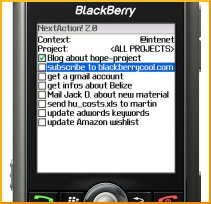
NextAction! is add-on software designed specifically for Blackberry handhelds, and it adds a new dimension to your Blackberry task management. It syncs seamlessly with the tasks on your desktop, works with Windows, Mac, and Blackberry Enterprise Server (BES), and supports desktop apps like Microsoft Outlook, Lotus Notes, Act!, Novell Groupwise, iCal, Entourage, etc.

Better tasks for Blackberry

Why do you need a better way to manage tasks on Blackberry? The Blackberry's built-in task application is woefully inadequate. It does a poor job with categories, has a cumbersome interface, and offers very little in the way of filtering.
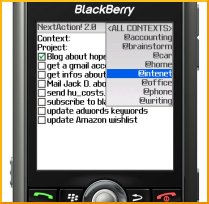
NextAction provides a clean way of viewing and organizing your tasks by Context (category) and Project (Contexts are automatically synched with the Categories you create on your desktop, while Projects need to be created within NextAction!). You can change your view with one click by selecting a new Context (see the view at right).

You can also create new next actions from within the NextAction! application, and mark existing tasks as complete. Furthermore, you hide completed tasks in your view so they get out of your sight when you're done with them.

You can try it risk free with the free trial version of NextAction! -- if you're a Blackberry user, and a GTD follower, I recommend giving it a spin to see if it will work for you.

Pros:

  • NextAction! isell-suited for use with GTD
  • NextAction is much better than the Blackberry's native Task application
  • Excellent support for Contexts / Categories
  • Coexists peacefully with built-in Blackberry applications
  • Excellent integration with Desktop applications and BES
  • Nice keyboard shortcuts to make managing next actions easier
  • Available in English, German, and Chinese language versions
  • Supports latest Blackberry models (Blackberry Pearl, 8800, Curve, etc.)
  • Nice, long, free trial so you can check it out before you buy

Cons:

  • Pricey - $40-$50 depending on where you purchase it (upgrades from v1 are $20)
  • Limited sorting capability - can't sort by due date or priority
  • Only supports Blackberry devices


Related items

Read More

Buy remarkable book, get remarkable deal, become remarkable leader

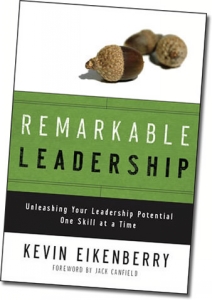
Ok, so I haven't read this book yet, but I can't resist passing on an awesome deal: when you buy Kevin Eikenberry's new book, Remarkable Leadership, you get a fantastic bunch of bonuses that make it worth its weight in gold.   To order, click one of the links above, scroll down to see the bonuses, and look for the ordering links near the end of the page - you need to order through one of those links get the bonuses.

In addition to the free stuff, there are a couple of other reasons I'm recommending this before I read it:

  1. I've been following Kevin's blog for quite a while, and I think he has some awesome leadership kung fu
  2. Kevin's trying to concentrate the buying of this book right away so he can become an Amazon best seller

On a related note, Kevin and his team also offer the Remarkable Leadership Learning System, which is a powerful program to help you become a better leader by guiding you through focused work on a specific topic each month. Check it out if you're looking for a leadership breakthrough.

By the way - I will be reviewing this book in the future - after I get my own copy!


Related items:

Read More

An interesting new GTD application

I've just been reading up on an interesting approach to tackling the Getting Things Done (GTD) - it's called "Wrike" and it looks very intriguing. They say they will save you 30 minutes a day if you use their tools properly.

Wrike is a web-based application, so you'll need internet access to use it, but that also means you can use it from anywhere. You get a simple "dashboard" to create and manage tasks, as well as reporting on future and completed tasks and projects. You can use tags and create heirarchical relationships to make it easier to group your activities.

Of course, Wrike wasn't specifically written for Getting Things Done, but they've recently posted great guidelines for how to use Wrike for GTD.

One of the more interesting features is the ability to create new tasks, projects, and delegation assignments via email. You compose an email to Wrike and the system uses that email to drive the task:

"Create a message with a task to one of your friends. Put wrike@wrike.com in the CC field and add the due date [yyyy-mm-dd] in the subject line. The template due date is currently shown as tomorrow. Then hit the send button.

Within next several minutes both of you will get an invitation from the system. You and your friend will be able to keep track of this task together. If the task is not marked completed by the due date, Wrike will remind both of you about it."

According to their documentation, you don't need to be online to update and manage these tasks - you receive email notifications, and can update the rest of your team via email through Wrike. Hard to visualize? Click here to see a video demo of Wrike in action.

They offer a free version and a Pro version ($5 per month) for individuals, as well as several flavors of team-oriented packages. For more info on pricing or to sign up, check out Wrike's pricing page.

I haven't really used this yet, since I tend to be more of an "offline" or Outlook-centric kind of person for GTD, but would love to hear your stories if you decide to use it. The free version should make it a safe experiment for the curious and adventurous souls among you.

Read More