Genuine Curiosity

Author Dwayne Melancon is always on the lookout for new things to learn. An ecclectic collection of postings on personal productivity, travel, good books, gadgets, leadership & management, and many other things.


Total Workday Control

In my continuing quest for methods and tools to make me more productive, I've been reading and applying Michael Linenberger's latest techniques from the 2nd edition of his book, Total Workday Control Using Microsoft Outlook. As I've chronicled here in the past (see "My GTD Odyssey"), I have been a follower of Michael's methods for a long time.


One of the reasons I liked them is that they were more prescriptive than -- but still philosophically compatible with -- David Allen's "Getting Things Done" (GTD) methodology. I found Linenberger's instructions to be more actionable and specific, and they helped me sustain my productivity better than GTD alone. As I mention in my GTD Odyssey posts, with GTD I missed the "go to the list; get next task" feel that I remember from my old Franklin/Covey days - and Linenberger's method feels more comfortable in this regard.

"Manage Your Now"


In this second edition, Linenberger has raised the bar again and introduces more techniques, workflows, and Outlook tweaks to help make things easier. He's even moved beyond "Total Workday Control" to establish a methodology he refers to as "Managing Your Now" or "MYN" for short (I suppose everybody's gotta have a 3-letter acronym, or TLA, these days).


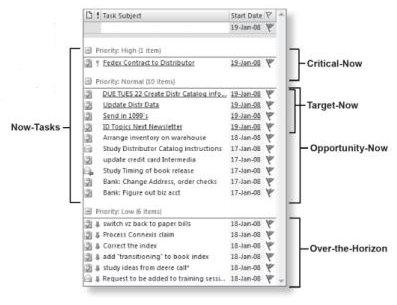
The book walks you through a step-by-step sequence for setting up Outlook for better email, task, and calendar management through the use of customized views to help you filter the information you must deal with to get your work done (the book's example of the Task view is at right).


MYN involves managing to a "Now Horizon" and segmenting your tasks. Basically, you are able to create several tiers of priority:


  • Critical-Now: the 1-3 tasks that must be done today
  • Target-Now: high priority items that you would like to do today but are not urgently due
  • Opportunity-Now: medium priority items that need to be done soon, and could be done today if the right opportunity presents itself
  • Over-the-Horizon: items that are on your lists, but you've consciously pushed them out for future consideration

This filtering and sorting method has made it much easier for me to become more methodical about working through the tasks on my lists, and the views described in the book provide a sort of "at a glance" cockpit to help you pilot your day. Find out more in the sample chapter available on the book web site.

The right tool for the job


You can go through the book and manually set up the views, but I recommend using a tool described in the book instead: The MYN special edition of ClearContext IMS. This not only automatically configures all of the special MYN views, it offers a ton of very easy-to-use shortcuts to help you become more productive with Outlook. The features are numerous, efficient, and sooo useful. I've been a loyal ClearContext customer for at least a couple of years now and couldn't live wthout it.


By the way - even if you choose not to adopt Linenberger's methodology, I highly recommend ClearContext. You can get the regular, non-MYN version at the ClearContext web site, and they even offer a 30-day trial so you can find out if it's a fit for you.


Some examples: I love being able to file a whole topic thread automatically, schedule follow-up tasks automatically, and use ClearContext's "Unsubscribe" button to make irrelevant email threads disappear

Commit - don't dabble

As I mentioned above, this book is much more prescriptive than the first edition. One of the asepcts of that is that it really requires a commitment for a few weeks to really develop new habits so you can get the benefits of Linenberger's methods. I think it's absolutely worth the commitment - I don't have exact metrics, but I think the books claims that you can increase your efficiency by 25% to 45% are in line with actual results.

And I also recommend taking a 'baby steps' approach to adoption, and focusing on the front half of the book to become proficient in the basics of task, calendar and email management before moving on to the more advanced topics later in the book (like project management and Goal/Project/Task management).

Summary

Total Workday Control Using Microsoft Outlook can truly help you "Manage Your Now" whether you're an accomplished GTD user or someone just getting started on the path to gain control of your workday. Just make sure you stick with it for a few weeks (21 days is a good rule of thumb) to ensure you get the benefits.



"You wouldn't like me when I'm unproductive..."

I read an awesome post by Tim Ferriss (author of The 4-Hour Workweek), on Time Management Guru-itis: Mark Hurst vs. David Allen and Tim Ferriss. It's quite an interesting analysis, and I think it is pretty accurate and insightful.

One of the interesting differences in Tim's dealio is that it's very much about how you feel as you live your life - not just how productive you are. As Tim puts it:

"Is responding to all inquiries on a moment's notice really success? I would argue it is a reactive mode that precludes life, at least the type of life I want to have."

I must admit, this is one of the things I often struggle with. Getting my balance slider bar set to the right setting is tricky. Why? Well, the optimum setting for balance can vary depending on the demands (or lack thereof) stemming from work, personal life, etc. There is the flip side, as well, in which you "impose" a balance setting on your life, then make your activities fit that setting.

Ferriss and David Allen (of GTD fame) both offer methods to impose your own balance setting, but they have completely different approaches for how to get there. I've learned tips, techniques, and philosophies from both of them, and I think they have both impacted my thinking far more than I ever expected.

Check out Tim's analysis and join the conversation (and thanks to Matt for pointing the article out today).

Read More

Control for team projects

I've been test driving a web-based project management tool called Projjex, and it is pretty cool. I'm using the free version, which is limited to a single project (but supports multiple users/participants for that project). Even with the single-project limitation, the free version of Projjex does a nice job of showing off the UI and features of the tool.
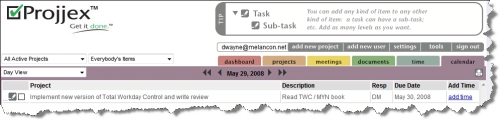
The user experience is very straight forward, and I can see myself using this to track progress on more complex personal projects, as well as using this for group collaboration.

Easy setup

Projjex makes it easy to set up a new project, add users, and begin adding and assigning tasks. If you want to migrate from an existing project management tool, they offer easy imports from Microsoft Project, Basecamp, or a CSV (comma-separated value) file.

The most common functions are easily accessible from within a project, via a straight-forward Edit menu (at right).

There are also so very good video tutorials in the product so it's a snap to get going.

Easy management

Projjex provides a clean dashboard to monitor the "next action" or "next in line" tasks and their owners (click the image below for a larger view - you may have to click it again in the window that pops up to get it to fully zoom).

The dashboard makes it very easy for a project manager to use for tracking and bugging people with due or overdue tasks.

There is also a good interface for scheduling and timing meetings, including distributing attachments along with the meeting invitation. However, I wish it had a bit more functionality to record meeting notes and associate them directly with meetings, as well as providing built-in functions to track open and resolved items, meeting objectives, etc. Perhaps in future versions... (though you can probably work around this with their powerful, collaborative Notes features).

Room to grow

For more projects and additional features (like time & cost tracking, and more disk storage for storing and sharing documents), you can upgrade to a higher level package. There are 4 fee-based subscriptions available (Team, Professional, Corporate, and Enterprise), each with a progressively higher monthly fee so you can scale up as you begin to use Projjex for more projects.

Check it out for free

As with many other web-based apps, this one is easy to try for free. Head on over to Projjex and sign up for your free account, or at least go through the Projjex overview tour if you have projects to manage. And you might want to keep an eye on these folks - they seem like they know what they're about.


Related items Read More

Is it ADD or Personality Type? My findings - Part 1

I love it when things connect. Recently, a couple of connections materialized from a couple of good friends.

First: Ariane Benefit sent me an inspiring post on how she overcame the challenges of Attention Deficit Disorder (ADD) and learned to thrive.

Second: My office-mate Gene shared a book review at Joyful Jubilant Learning (the book was The Head Trip) and began talking about how he was going to delve into neurofeedback as a way to become more focused and productive, and compensate for ADD-like tendencies.

Maybe the first step is to wonder whether you have a problem?

As someone who is peternaturally curious, I've often wondered if my tendency to flit from one interesting topic or another was normal or not. I still have a tough time drawing the line between "classic ADD" and "easily bored."

Ariane's story is very interesting. She shared her thoughts and doubts prior to being diagnosed with ADD in a very coherent, rational way - and I think her philosophy applies to just about anyone struggling to overcome a personal challenge.

So, what does ADD look like? General characteristics1 include: (a) difficulty staying focused, easily distracted, not completing tasks (except in some cases "hyperfocusing" on something like a project due tomorrow or fast-moving video game); (b) restlessness/impulsivity/impatience, e.g., can't sit still, blurting/interrupting; (c) problems organizing, planning, prioritizing (often late and hurried); (d) starting projects and not finishing them.

These traits can impact your relationships, self-esteem, and career -- but they are not insurmountable.

Taking responsibility for your own well being

Ariane has taken the bull by the horns and is actively capitalizing on her strengths, rather than falling into the "glass half empty" trap and limiting her aspirations. She shares a bunch of cool stories that provide a glimpse into how she's playing to her strengths.

Gene identified with some of the symptoms he read about in The Head Trip and is exploring neurofeedback, one of the techniques described in the book, to maximize his focus and overcome distractions.

The cool thing I learned from Arian and Gene is that they both used their natural intellectual curiosity to fuel their actions, and weren't satisfied with the status quo. I also learned a lot about ADD, how chronic disorganization may be an indicator of ADD, and how you can cope (and thrive) with ADD.

Still wondering?

Not sure if you have ADD or not? Check out this great article shared by Ariane, "What's it like to have ADD?" to find out more.

Got ADD? Don't worry - you're not alone. Fantastic people like Ariane and Gene have helped me understand some of the differences in how people with ADD engage with the world, and have pointed me to resources to help people with ADD capitalize on their gifts.


Related items

  • Series of awesome posts on dealing with ADD

1 "How Do I Know if I Have ADD? Is There a Self-Test?"

Read More

Enterprise Collaboration and Virtual Teams Report (April 25, 2008)

I was in an intersting discussion the other day about time auditing since I've written a good bit about this topic (see "Related items" at the end of this post). The gist of the discussion was, "Time auditing seems like a lot of work and I end up thinking a lot about minutiae - why should I do it?" I can see why folks might feel that way. After all, time audits require an investment from you - of time, attention, and effort.

I'm a certified IT auditor, and I tried to explain the value using analogies from business audits.I'm not sure I entirely succeeded, but wanted to share some of my thinking here to get your thoughts on the concepts. They're very rough, but may be useful.

Don't audit everything equally

  • In a business audit, not every control or process is equally important. You tend to start with a top-down, risk based audit to identify your most important processes and most significant risks. You then spend your audit efforts on things that have the most risk / potential to screw up the important results.
  • In time audits, not all your activities are equally important. Try to think about the important activities (those most closely tied to your success), or your most risky activities (those activities most likely to chew up too much time on the clock, those most likely to sabotage your results, etc). Then, you can audit / scrutinize those areas most since they'll be where you get ROI from the time spent on your audits.

Keep records of the evidence you've gathered

  • In business audits, you keep "work papers" to record what you've observed, what people have told you, what metrics are in place, what controls are in place, reports to substantiate control effectiveness, etc. These are crucial so your findings are fact-based, specific, and accurate.
  • In time audits, you should keep "evidence" of what you've done and try to make the details accurate enough so your findings are based on data and not your fuzzy memory. This is also where some of the best a-ha's come from, like "Oh - if I leave at 6:55 instead of 7:15 in the morning, that cuts 40 minutes off my morning commute..."

Write up your findings

  • In business audits, audit reports are your means of communicating what you've seen, what's effective, and where the organization is deficient in its controls or practices. This forms the backbone of how you communicate the issues to others and formulate an action plan. You can also review the findings from previous audits to find out if any of the old problems have improved or worsened.
  • In time audits, you need not be so formal, but I have found it helpful to write up a "report" at the end of your time audit with key themes, problems, and good things you've learned from analyzing your evidence. You can keep these as a record of your progres for comparison in future time audits.

Create a follow-up plan

  • In a business audit, you work with management to come up with a plan to address deficiencies, and track to that plan. This process ensures that management takes responsibility for the controls and their effectiveness and helps set explanations for the timely resolution of significant issues.
  • In a time audit, you can do something similar by identifying your most significant issues and creating a written plan (with targets) to improve them. This gives you something you can track against to help drive improvements. Part of the plan should be to review your progress against the plan at some point in the future.

These are just a few ideas to help apply some of the principles of business auditing to your time audits. What do you think? Does this thinking hold up for you? Why or why not? And what other principles do you propose for more effective time audits?


Related items

Read More