Genuine Curiosity

Author Dwayne Melancon is always on the lookout for new things to learn. An ecclectic collection of postings on personal productivity, travel, good books, gadgets, leadership & management, and many other things.


[Updated] Getting David Allen and GTD — On Demand

A couple of years ago, I wrote about how I enjoyed a regular "refresher" to get re-connected with David Allen's Getting Things Done (GTD) methodology. At the time, my touchstone was to listen to David's 8-CD series, "Getting Things Done Fast," which was a recording of one of his live seminars. I later found that my copy of this wonderful program is quite rare, and they have been out of print for at least 2.5 years. That's a shame, since the program was a great resource. I've loaned it out to a few close friends, but that doesn't scale very well.

You are no longer out of luck

I've got good news, though. I recently ordered a copy of a new offering from David and the gang - it's called "GTDLive!" and it is a 10-CD recording of a live seminar that David conducted about GTD. At $395 US, it's not cheap but it is...

  • cheaper than going to a live seminar;
  • better than the old GTD Fast set since it comes with a bit more material and a set of laminated GTD templates;
  • reusable on-demand, any time you need a refresher.

I just finished listening to this over the course of my daily commutes (it took over a week to get through it all - there is a lot here), and it was a shot in the arm to get me back on the wagon with some of the GTD habits I've been neglecting.

Check it out - and you, too, can have David Allen talking to you with the push of a button.

P.S. GTD Connect members get a pretty good discount on this program.

[Updated]
P.P.S. If you already have the original GTD Fast set, I don't think this one is worth the extra cash since they are very similar in the fundamentals of GTD. However, if you don't have the old one I think you'll love this new GTDLive! set.

Read More

Yapta gets more amazing

Yapta (Your Amazing Personal Travel Assistant) which I reviewed in the past, is launching some new capabilities today. To refresh your memory, the things Yapta is best at are:

  1. helping you track airfare prices to get the best deal (you get alerts when the price drops) and
  2. helping you get money back from the airlines if the price drops after you buy your tickets (again, they alert you and provide instructions for how to get a refund or a voucher from the airline)

I've been using this for a while and, thanks to "best" #2, I've gotten several hundred dollars back form United when my airfare dropped on one of my family's vacation trips.

What's new today?

In the past, you had to use a browser add-on to get Yapta's functionality, which meant you used a bunch of other web sites to search for flights and used the add-on to "tag" the trips you want to watch.

Now, they've unified several capabilities into a web experience that doesn't require a browser add-on. You can, through their web site:

  • quickly search for the cheapest flights based on your saved preference profile,
  • start tracking price fluctuations for a number of routes and flight combinations all at once (great for planning trips that are a good distance in the future), and
  • get alerts via email when fares drop or fall below a "target" price that you can configure.

After you purchase your ticket, the site will alert you when you're elegibile for a travel credit from the airline. That's how I got my vouchers from United - and it was dirt simple, since I followed the instructions Yapta included in their email.

They've also added some other convenience features like storing your frequent flier numbers, information on your unused tickets, and information on your travel credits.

There's much more than I've described here - check it out yourself -- for free -- at Yapta today.

Read More

Smart To-Do List software

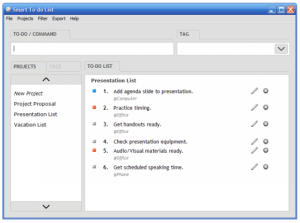
If you're looking for a straightforward way to track your to-do's, organize projects, and keep yourself on track, you might find what you need with "Smart To-Do List." This Windows-based application helps you create projects, track progress, rate task importance, and filter your tasks.

The software is intended to be "GTD Friendly" so you can manage projects, priorities, and contexts all from within the tool. For example, you can tag tasks @Office if they need to be peformed at your office, and you can filter based on these tasks. Pretty neat approach.

The product does a nice job of segmenting tasks by projects, as well, and I found it very easy to change projects or contexts and quickly refocus on what I should be doing.

For me, the only drawback is that all of my task information "lives" in Outlook, and there is no automatic synchronization. This product does offer import/export capabilities, but they are manual as this is really a standalone application.

I am experimenting with using To-Do List as the UI for a couple of projects to see how a blended approach works. Basically, I put a "pointer" in my tasks list in Outlook for a project, which reminds me that the project 'lives' in Smart To-Do List so I can manage it from there.

I've been trading emails with the folks at the company, and they are really passionate about this product and committed to ongoing enhancement of the product so I'm optimistic the product will be even better in the future..

The publisher provides a free, 30-day trial so you can download Smart To-Do List figure out if this is a tool you want to adopt. By the way - if you decide to evaluate it, be sure and read the help file - while you can start using the product immediately without it, the Help system introduces some advanced features that are not obvious from looking at the UI.

Read More

Eluma opens it up

Last month, I wrote about Eluma 2.0 (Eluma: Browse, organize, and share) which is a pretty cool tool for organizing, sharing, and tracking web-based information (web sites, RSS, web clippings, etc.) on Windows XP and Windows Vista. At the time of my original review, Eluma was in private beta.

Good news: Eluma has unleashed the hounds, and Eluma 2.0 is now in public beta. You can find out more about Eluma and download the beta at their web site. They also have a useful blog that discusses how to cope with information overload (using Eluma, of course).

Here is their video fly-by:

There is a lot of new stuff in the new version, and it keeps improving.

Technorati tags: , ,

Read More

Improve your productivity: Establish your operating principles

Last week, I posted about some excellent analysis by Tim Ferriss ("You wouldn't like me when I'm unproductive...") comparing the "fighting styles" of various productivity gurus. If you aren't familiar with Tim's work, he is the author of "The 4 Hour Work Week," which is chock full of ideas to change you life. It certainly changed my mental models in a significant way.

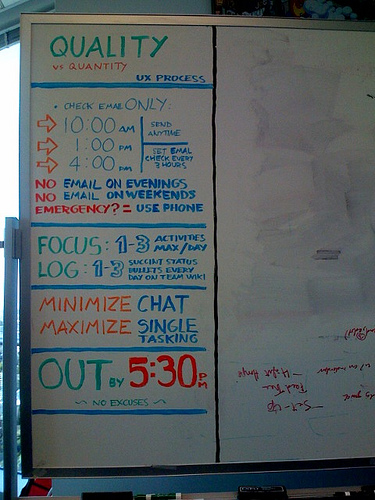
Anyway, browsing around Tim's blog, I stumbled across his Flickr photostream where I saw the photo at right. It depicts a set of operating guidelines he developed while working with a department in a Fortune 500 company.

I really like this concept, and my colleague Matt and I are just beginning to experiment with our own variations of this approach. If you break down what's on the board, it has an excellent set of guidance embedded in it:

  • Throttle back on email. Don't check it constantly, and don't do work email away from work.
  • Focus on a few specific, high value activities per day.
  • Record your results - and if you're on a team, let the team know what you're doing (I love that they are using a Wiki for that).
  • Minimize unproductive chatting.
  • Focus on one thing at a time and avoid the overhead of multitasking. (My buddy Gene and I use the analogy that even though an air traffic controller has lots of planes queuing up, each one should only land one plane at a time.)
  • Get out on time. I think this has a good psychological effect for driving better focus, and helps prevent tasks from expanding to consume all the available time.

I'll keep you posted on how it goes with our experiment. I don't know if I can go quite as "purist" as what's on this board. For example, given how my work is structured, it's unlikely that I'll totally eliminate all after-hours email in the near future, but I can certainly do less of it.

Even so, I definitely think establishing some operating guidelines like these will help me and the others on my team.

Read More