I've been running the new version of Claritude Software's SpeedFiler, which is an Outlook add-in designed to streamline the way you file messages in Outlook.
If you ever use Outlook's [Ctrl]+[Shift]+[V] keystroke combo to move messages to filing folders, you know that it is a good habit to develop, but it requires a lot of steps if you use subfolders (the Outlook UI is a little clunky). I've been using this since I got hooked on David Allen's "Getting Things Done".
Outlook's clunky old filing
If, for example, I want to use the traditional Outlook UI to file a message in a folder called Inbox/Customers/Fictional, I have to:
- type [Ctrl]+[Shift]+[V] to get the move dialog,
- type "IN" to get to the Inbox folder,
- hit the [Right] arrow to expand the subfolders under the Inbox,
- type "Cust" to get to the Customers Folder,
- hit the [Right] arrow to expand the subfolders under Customers,
- type "Fict" to get the the Fictional folder,
- hit [Enter] to save the message to that folder.
 SpeedFiler's better way
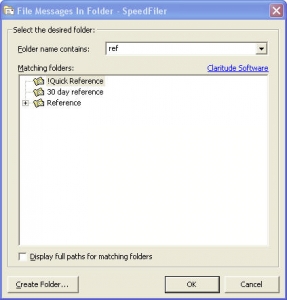
SpeedFiler replaces Outlook's dialog for filing. To do the same thing with Speedfiler, I would:
- type [Ctrl]+[Shift]+[V] to get the move dialog,
- type "Fict" to get the the Fictional folder,
- hit [Enter] to save the message to that folder.
Much easier, and a lot less hand movement.
Another cool thing - if you have multiple folders with similar names, SpeedFiler narrows down the list as you type - you can see an example in the screenshot I snagged and posted here, in which I begin to narrow down my various "...reference..." folders.
Other tips and observations:
- SpeedFiler helps with retrieval
- One of the drawbacks of filing is that it gives you more folders to navigate through when you want to retrieve things. SpeedFiler helps there - their CEO, Itzy Sabo, turned me on to a very cool shortcut:
- When you want to navigate to one of your folders, hit <Ctrl>+Y, and the SpeedFiler dialog pops up and you can start typing to narrow down the folder you want to go to. When you've typed enough, hit <Enter> and you're looking at your folder. Beats the heck out of mouse-based navigation.
- By the way, Itzy's blog has some great productivity articles, as well.
- SpeedFiler plays well with other children
OK, gadgetboy - what's the big deal?
As David Allen says in his book, filing needs to be easy or it won't get done consistently. SpeedFiler makes it easier to do mundane filing, therefore it is more likely you'll file things consistently.
If you're an Outlook user (using Getting Things Done or not), I recommend you give it a whirl and download the 30-day trial of SpeedFiler
Read More

 From there, you'll see some information about the aircraft configuration along with a color-coded seat map that will help you determine whether your seat is good, bad, or other. This is also helpful if you want to ask for specific seats either on the phone or while talking with the gate agent.
 Michael S. Hyatt says that some people question whether his blogging is a good use of his time. After all, he's the CEO of a huge publishing company and he blogs on a corporate blog every day. He doesn't think it's a waste of time (maybe it's just me, but it seems kinda natural for the head of a publishing company to publish every day...). Anyway, I love his treatment of this topic -