Genuine Curiosity

Author Dwayne Melancon is always on the lookout for new things to learn. An ecclectic collection of postings on personal productivity, travel, good books, gadgets, leadership & management, and many other things.


New Help for Old Project Management Problems

teamusingcomputers.jpg

Over the years, I've done a lot of jobs.  One thing that's remained constant: Effective project management - especially in a team-oriented project - can mean the difference between success and failure.

Once the project and budget have been approved, the real work of project management begins. Tracking the project tasks and communicating with the team are ongoing efforts that every PM faces. For some time, a PM has had to rely on the same set of tools. With the latest cloud technology, software as a service (SaaS) solutions are available to help the PM stay more organized and connected with the team.

Netsuite

According to PR Newswire, Gartner research states that almost 50 percent of manufacturers will be using some form of SaaS by 2015. Netsuite is a cloud-based resource management system that provides leaner manufacturing and resource planning to stabilize your company. It gives you visibility across the business in real-time. With this level of visibility to the various processes, you have better manufacturing resource planning and management. You can pay close attention to forecasting and inventory management. Netsuite gives you demand planning capabilities to create a more finely tuned forecast. Using sales projections, trends, seasonal fluctuations and historical data, you can come closer to your on demand inventory needs.

Asana

This tool provides a lot of organizational flexibility. The PM has various ways of slicing-and-dicing multiple projects and teams to allow better collaboration and communication. The PM has control over how workspaces, projects and tasks are organized for visibility and easier tracking, according to lifehack.org. Workspaces are work areas that can contain one or more projects and tasks. They can be shared with multiple people. Multiple workspaces may be created to reflect different areas of focus. One workspace could be created for a new-product development effort and another for marketing campaigns for an existing product.

Projects are created within workspaces and can be either public or private. A public project may be accessed by everyone who has access to the workspace, like when you need the entire team to access smaller projects for only a subset access.

Tasks are the work units of a project and they also can be created as public or private. The comment system within tasks allow a greater collaboration between the team members without relying on email. A project history of task communication can be stored this way.

Once a project manager understands how to set up workspaces and projects in Asana, it can become a tool to make collaboration, communication and tracking easier for the PM.

Smartsheet

Smartsheet is structured like a spreadsheet with rows and columns and is flexible and customizable that integrates with Google Docs. This is a good choice for specific project management needs that other solutions don't offer. Spreadsheets can be organized in folders or workspaces. Each sheet can be shared with multiple people. The reporting capability is more than just formatted output. Reports can be made to be drilled-down into or used interactively, such as in what-if scenarios. Smartsheet is supported by a number of articles, videos and tutorials. There are webinars available to learn more about how to customize the product to meet your needs, according to reviews.com.

Google Docs

If you are on a limited budget, or if you need a minimal project and resource management system, Google Docs may have enough capabilities for you and your team. This is a hybrid office automation system with word processor, spreadsheet, graphics capabilities and the ability to collaborate on documents. While not organized specifically for the PM, the pieces manage a small project. Just don't expect automatic Gantt chart creation or resource leveling across tasks, according to lifehack.org.

Project managers have dealt with tools that came out 20 years ago or more. Even updated, they don't take advantage of the features that the cloud offers. These tools give the PM more flexibility and choices on how to set up and manage their projects.

​Those are a few options, in a nutshell.  If you're using something different that you absolutely love, or you have real-world feedback on any of these options, please leave a note in the comments..

Pack a sport coat, suit coat, or blazer without wrinkling

Last week, I shared some of my tips for packing without wrinkling.  I mentioned the Eagle Creek’s Pack-It Folders that I love, and stated you can use them for dress shirts, pants, and jackets.  That is true, but I stopped using them for jackets in favor of another method.

You see, I am tall, and have wide shoulders, so my jackets didn't fit inside the Pack-It folders very well.  I now use the method shown in the video below.​

This method works very well and I use it all the time.  When you arrive at your hotel, simply unfold and hang the jacket in your closet, and it will look great the next morning.​

​This method has another advantage - if you decide you want to toss your jacket into your suitcase (to be more comfortable on the plane, for example), you simply fold it like this, open your suitcase, put the jacket inside on top of your other clothes, and carefully zip the suitcase shut.  Very simple.

Pack Without Wrinkles - New Updates

Note:  Packing without wrinkles is something I've written about quite a bit, and I wanted to take some time to provide some updates.

As a frequent traveler, I want to share some packing tips that have helped me stay free of wrinkles. I have tried many methods including a classic method detailed on the Men’s Wearhouse site; steaming my clothes in the bathroom on arrival, voodoo, etc. None of these methods quite did the trick, even with wrinkle-resistant clothing (see my note at the end of this article).

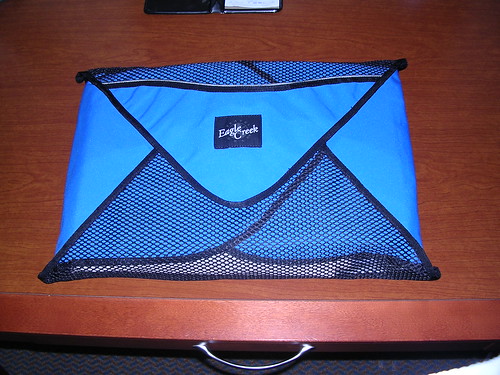
My wrinkle-free status improved significantly recently, when I discovered Eagle Creek’s Pack-It Folders. These are phenomenal for keeping dress shirts, pants, and jackets wrinkle-free in your luggage (they also work with skirts, but I haven’t tried that).

Eagle Creek also offers Pack-It Cubes, which I use for general organization (you’ll see how it all works together to tidy up my suitcase, below).

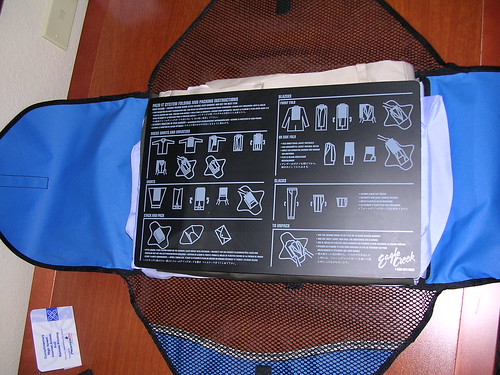
 The Pack-It Folders come with a sturdy plastic folding board, which has detailed folding instructions printed on it. The diagrams on the board guide you through the folding process, and are very easy to follow.

Folding a dress shirt with the Eagle Creek Pack-It Folder 

Click thumbnails for larger view

  • Start by buttoning a few buttons on the shirt (I button the top, third, and 6th buttons), smooth it out, and place it buttons-down on a flat surface. Then, fold the right sleeve across and fold the sleeve down at an angle, as shown in this picture.

  • Next, fold the other sleeve across the folding board, then angle the sleeve down just like you did for the first – as shown here.
  • Next, fold the tail of the shirt up to the collar (the board forces you to fold it in the right spot), then flip the shirt over, place it in the center of the Pack-It Folder, and remove the board. You now have one neatly folded shirt.

  • You can fold several and stack a number of shirts (the number depends on the size Pack-It Folder you are using). When you’re done, you place the folding board on top of the whole stack to help keep everything flat.
  • Next, fold the flaps closed on the Pack-It Folder to make a nice, tidy bundle.

The Pack-It Folder and the Pack-It Cubes work together to make a very tidy suitcase. And, when you reach your destination, you can unpack and things look almost as crisp and fresh as when you got them back from the cleaners. Click the image for a tagged version of what’s what in the picture.

Note: For maximum effectiveness, I recommend buying wrinkle-resistant dress shirts and pants. I prefer Lands’ End or Nordstroms' line of "Smart Care" shirts as they come in exact sizes and are fantastic when it comes to shedding wrinkles. As a bonus, they are also stain resistant!

Next time, I'll share how I deal with jackets (suit coats, sport coats, etc.)​

The Easiest Way To Improve Your Presentation Skills

705_3453589.JPG

​In my line of work, I end up doing a lot of presentations.  I've also studied a lot of information on how to become a better presenter.  A long time ago, I took a class from Distinction Communication, a company that helps people develop more effective presentations (and presentation skills).  Since then, I've taken "refresher" courses from the same folks.  You can find a lot of free, helpful presentation tips and videos on the Distinction site, by the way.

Seeing what you don't see

One of the most effective techniques I learned was to videotape yourself presenting so you can see how you appear in front of an audience.

​I must say, the feeling is both discomforting and extremely powerful.  Not only do you get to hear how clearly (or unclearly) you communicate, you also get to see the nervous habits you don't notice from inside your own body.

For example, you may notice you use a lot of filler words, like "Um" or "Uh."  You may find that you rock back & forth a lot, or don't make eye contact with your audience.  You may also find that you make strange gestures that distract from your content.​

All of these sorts of things are normal but very hard to notice when you're actively presenting.

DIY presentation skills improvement

For a long time, the only time I ever had my presentations recorded was during these training / coaching sessions.  Last year, I realized I could do this kind of "presentation audit" myself pretty easily using tools that were readily available to me.​

If you want to record your presentation, you can easily do it using your smartphone, tablet (iPad, Nexus 7, etc.), or the webcam on your computer.  Lately, I've been practicing my presentations the night before in my hotel room and using my recorded session to identify problems with my presentation.  I find it very helpful.​

​The key is to be in full "show mode" -- from a personal perspective, not just a PowerPoint perspective.  In other words, pretend you have a full audience and present as though it were the real deal, as this will provide the most useful data from which to improve your skills.

It's also kind of fun to keep some of these presentation audits so you can look back and see how your skills are evolving.​

The Perils of Cloud Apps

In the past month or so, a couple of cloud applications announced they were pulling the plug:  Google Reader and Astrid (a cloud-based task management application, which was purchased by Yahoo).  Luckily, both of these gave plenty of lead time to their users and provide ways to export their data for migration to other services.

​But what if your cloud app disappeared without any warning?

1670048.JPG

What are some things that can help you if a cloud application disappears out from under you?  Here are some things I thought of - if you have others, please leave them in the comments.​

  1. Openness: Applications that use open standards or output formats make it easier to move from one service to another.  

    ​For example, Google reader supports OPML (for input and output), making it easy to import and export feed lists from one program or service to another.  In many cases, data can be exported to CSV (Comma-Separated Value) format - not a fancy format, but very broadly supported.

    ​The main thing?  Figure out how you would move out before you move in.
  2. Backups:  It's OK to rely on a cloud application, but don't be too trusting.  Periodically make copies of your data and store it in a safe place outside the cloud application.  The frequency, number of versions, etc. should be driven by the value of the data you're storing in the cloud app - the more valuable (or the harder to recreate), the more you need to increase the backup frequency, number of backup locations, and version depth.
    ​ 
  3. Look for offline / "permanent" options, or hybrid solutions:  Some cloud applications have local clients that cache / synch data locally.  Often, this feature is present to allow offline access to the data, but it also provides security if the cloud app is unavailable, or goes out of existence.
    ​ 
  4. Backups, backups, backups: I mentioned backups before, but I'm serious - having a backup is your best bet in case the unexpected happens.  You may even want to go as far as printing out some of the data (or printing it to a PDF) as an extra precaution.
    ​ 
  5. Pay for your service:  These days, I am more open to paying for a service that I like under the naïve assumption that if I pay the vendor for their service, they are more likely to keep providing the service.  Even if there is a free option, I often pay for services that I find to be "indispensable" - Evernote is one such example.
    ​ 
    ​Of course, that isn't always a guarantee - I had a paid Premium subscription to Astrid, and they're still shutting down the service due to the Yahoo acquisition.  Of course, they'll be giving me a refund for the unused portion of the subscription, but I'd rather have the service.

Those are just a few tips that come to mind - any other lessons learned that you care to share?  If so, leave a comment.​