A long time ago, a man named Harry Beck came up with a way of cleanly mapping London's Underground station network. It was revolutionary in that it hid complexity by focusing less on details and more on the big picture. Beck's method has become the standard for clarity, efficiency, and effectiveness in public transit.
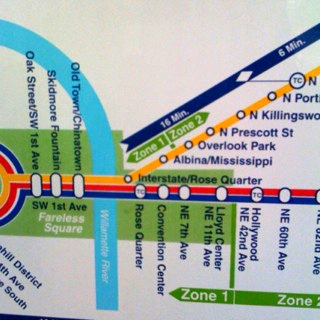
As I was waiting for a train this morning and saw our local "Beck style" map, I wondered how this applies in corporate settings.
When organizations communicate vision, direction, initiatives, etc. how often do we confuse people by being too detailed, accurate, and "busy" in our maps?
Our challenge is to come up with a map of our organization's vision that Harry Beck could be proud of.
Read MoreThey say those of us in the US will eat just about anything if you put it on dough and cover it in cheese. That may be a slight exaggeration, but I had two reactions when I saw the video below.
- That's pretty funny (but plausible if marketed properly).
- I wonder what that could do to increase productivity?
You decide. It's entertaining no matter what (note, you may have to click the link below the video to get it to work).
New Wearable Feedbags Let Americans Eat More, Move Less
SPECIAL NOTE: The "Jason Womak" in the video is not to be confused with my friend Jason Womack (even though Jason Womack does have some awesome productivity mojo).
Read MoreI've been a bit busy lately but, in cleaning up my inbox I found several very cool news updates that I want to share with you:
SameCell is now at Version 2.0!
 I've written about SameCell in the past (here and here) and still think it is a very cool app for the Blackberry. It is even cooler with their version 2 (full list of new features on the SameCell web site).
Beyond some nice interface improvements I think my favorite new feature is their new Events feature (example at right), that lets you create new events (and even new event categories) and broadcast them to other SameCell users nearby. You'll notice an intriguing "Speed Trap" event, for example. You can also customize how you broadcast any event to others - including whether you share your contact info, your location, etc.
They've also added some tagging and rating features to you can tag favorite locations, rate restaurants, and things like that. Very nice additions to an already powerful application.
And it's still free. Find out more or sign up at the SameCell site if you're interested. I've already dropped my hints there that I'd love to see an iPhone version, by the way.
Free photo calendar creation tool available
Thanks to Kathy for telling me about a free online tool to create calendar pages with the photo of your choice. You can print any month's calendar with an image you upload on the page size you select. In a few seconds, you have a PDF of that month's calendar that you can print or share. Perfect for hanging at work or around the house.
My kids will have fun with this one! If you want a sample, click here to download an August 2008 calendar page I made . It features the picture I used to create the current Genuine Curiosity banner background (it's one I snapped of a museum in Cannes, by the way).
You'll note there is not advertising or anything else on the calendar - just your stuff. Pretty cool.
Corporate Change Manifesto at ChangeThis!
My friend Mike Kanazawa (author of Big Ideas To Big Results) has published a paper at ChangeThis called, "People Don't Hate Change, They Hate How You're Trying to Change Them." I worked with Mike and a team of others on a corporate transformation at Symantec Corp. back in the 90's and really admire his perspective. This manifesto is no exception. My favorite section is "Do More On Less" - which is a great treatment of the power of focus in a corporate context.
Download Mike's manifesto today - it's great reading. And watch for my review of Mike's book coming soon.
Read MoreWhen life gets busy (or my curiosity gene kicks in), it can be hard to focus on what's really important. As you've seen before (see "Related items" at the end of this post), I often turn to tools like PowerPoint and Mind Manager to make my life easier.
As for focusing on priorities, I have found that PowerPoint's "Smart Art" tools are particularly useful for creating a "Top 3 Focus Areas" list each month. On this one-page cue, I add my top 3 focus areas, and my top 3 desired outcomes for each. Essentially, these become my "must get done" items for the month.
I then print out the page, carry it around with me and make notes on the page to help track my progress, update my boss & peers, etc.

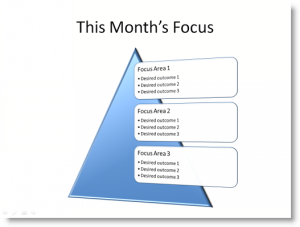
This is amazingly simple and very effective. I happen to use PowerPoint 2007, which has some snazzy templates (I often change them around just to make life more interesting - a couple of examples are shown here).
Give it a try, and see if it helps you focus.
Related items:
Read More
When I boarded my plane this morning, I sat in my emergency exit row seat (next best thing to a First Class upgrade) I was pleasantly surprised to see that this plane, a Continental Boeing 737-800, has power outlets throughout the plane!
Of course, the plane *didn't* have video or audio on board, but I'll take a "bring your own" model with power any day. Now, if only they'd add these to every plane...
By the way, this also gave me an excuse to try out Typepad's mobile client for the iPhone to snap the phot and write this post. Pretty cool little app.
Read More
