Genuine Curiosity

Author Dwayne Melancon is always on the lookout for new things to learn. An ecclectic collection of postings on personal productivity, travel, good books, gadgets, leadership & management, and many other things.


The times they aren't a-changin'?

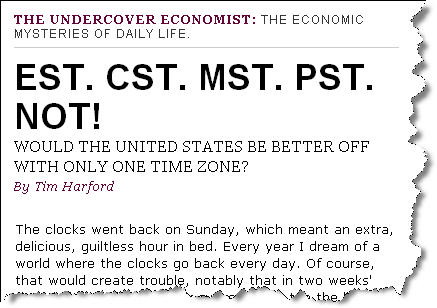
I just read an interesting article in Slate discussing the notion of moving the continental US to a single time zone.  The article also suggests doing away with Daylight Savings Time.

This is interesting, and why shouldn't we do it? After all, China should have 5 time zones and they use a single zone, so wouldn't it work for us?

The article talks about TV schedule impacts, etc. but I've thought of a few other interesting challenges with this notion:

  • Whose time zone would we pick?  You just think political battles are messy now, wait til you have the populous states of California and New York battling it out over time zones!
  • How would this impact air travel?  I travel a lot and rely on the time zone differences across the US to get meetings in on the east coast and still make it home before everyone's asleep in Oregon.  I also use redeye flights sometimes and count on my ability to "play the zones" to fit more in and minimize time away from home.  This would put a crimp in that, for sure.

What do you think?  I don't think this'll happen any time soon (if ever) but it's fun to ponder.  So click on the image below to see the full text and ponder away...

I'd much rather the US move to the metric system.

Timezones_1

Read More

A couple of interesting GTD tools / resources

After posting on my GTD Odyssey, I found out about some other great resources for the curious.

Ready-Set-Do Tutorial video

In Part 4 of my Odyssey, I mentioned Ready-Set-Do!, which is a set of tools to support a strong GTD workflow on the Mac. I don't use a Mac, but was very impressed by some of the videos Todd (creator of Ready-Set-Do!) has assembled. In particular, the section of the Tutorial on "Juggling the GTD Workflow" really captures the essence.

I asked him to post the video as a standalone link, and he gladly obliged. Go check out the Ready-Set-Do! Tutorial video, at this link. Then, if you're a Mac user and want to use this awesome software, go to the main site.

tedium

The next cool find is called "tedium" and I found out about it from Adrian McEwan at MCQN Ltd. This is a web-based productivity management system that isn't GTD-specific, but ties nicely with the "simple tools to manage complex lives" philosophy. You can go through the demo of its capabilities and give it a test drive, and decide whether you want to subscribe to the services (there is a time-limited trial available).

I really like this one, but am too "offline" to use it as a primary system these days. I'd love to see something like this evolve into a blended online/offline application.

Adrian would love to get input on this, as well as feedback on why you would/wouldn't use it for daily life - go check it out.

Scrybe

It isn't production-ready yet, but the video on the Scrybe homepage is awesome. This looks like it could really rock the world of productivity in a platform-neutral way. One reason I am intrigued: it seems to blend Web 2.0 and offline functionality in an impressive way. Go check out the video and see if you don't start drooling, too!

Keep those cards 'n' letters coming, folks!

What's inside your stone?

I spent some time in Calgary and Pittsburgh this week, which afforded me some good plane time to chew through a new book I just received. Short review: Wow - you should check this one out!
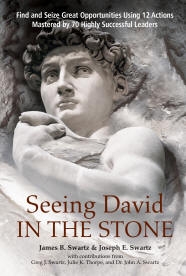
The book is "Seeing David In The Stone," by James B. Swartz and Joseph E. Swartz, and it is about how we can learn to be more effective at unlocking our opportunities and shaping our futures by studying the methods of some of the great geniuses of the past.

I think this is a great companion to Dick Richards' "Is Your Genius At Work?" which I reviewed about a year ago. Dick's book is about how to identify your personal, unique strengths, and this book provides some tremendous techniques to help you apply your genius in different ways to maximize the impact of that genius.

The book's an easy, enjoyable read and is presented as a sort of conversation between a learner and his mentor. It's a captivating story, laced with specific case studies of people like Einstein, Marie Curie, Michelangelo, Edison, Da Vinci, and a 65 other masters of their craft. A lot of the stories are from long-ago history, but you'll be pleased to find some spotlights of recent breakthrough successes, as well.

What's so special about this book?

I occasionally allude to some of the IT process consulting work I'm involved in as part of my 'day job,' but it's been more than just consulting. I've been privileged to be part of a groundbreaking research effort to observe and catalog the best known methods of high-performing IT organizations around the world. This research has led to some revolutionary, prescriptive guidance that enables any IT organization to benefit from the things the high performers have Darwinistically evolved on their own (shorten the learning curve, if you will).

"Seeing David In The Stone" has a similar feel to this IT research, since it catalogs and analyzes the practices of some of the most influential people in history. The book then provides a clear, ordered, 12-step process to help you tap into the best known methods of these highly successful leaders.

The practices are context- and industry-independent, and are well explained in the book. I read the book over the course of two flights this week, and found myself getting energized and excited about applying the principles in the book. Some of the concepts "clicked" so hard for me that I could literally feel the connection in my head.

I highly recommend this book for anyone who's involved in a creative pursuit, or who has the spirit of a learner, entrepreneur, or inventor.

Read More

Fresh Gear: My favorite presentation remote

I do at least 10 live presentations a month, and I love my presentation remote. I've been using the Logitech 2.4GHz Cordless Presenter for about a year now. Having used lots of other remotes that left me dissatisfied for one reason or another, this one has been perfect. When I was shopping for it last year, I created a list of selection criteria:

  • Compact size
  • Easy operation "by touch" (i.e. simple enough to operate without looking at it)
  • Must use standard batteries (not button-cell or other batteries that are tricky to find while traveling)
  • Must have an on/off switch to prevent accidental draining of the battery
  • Must be plug & play in Windows XP

The Logitech Cordless Presenter exceeds this short list of "must haves." It is small, easy to operate "by touch", uses two AAA batteries, has an on/off switch, and has built-in driver support in Windows XP. It also has additional beneficial aspects (lagniappe, where I come from):

  • It has a built-in countdown timer that you can set to help keep you on your time schedule. It provides a silent, vibrating reminder when you have 5, 2, and 0 minutes left.
  • It has a built-in laser pointer.
  • It is quite comfortable and natural to hold while presenting.
  • The controls provide forward and backward slide navigation buttons, as well as a button to blank the screen.
  • The range is very good - I've operated the controls from 45 feet away with no problems.
  • The remote includes a USB receiver that actually plugs back into the remote itself for easy storage - and you won't lose it this way.
  • It includes a neoprene, custom-fit storage sleeve to protect it during travel.

If you do much presenting, I think this is the remote you've gotta have.

Catch Up - Two Minute Rule

One of the coolest aspects of the Getting Things Done (GTD) "vibe" is that you can (and should) tweak the system to fit how you live, think, and work. As I've shared in my last few chapters of my Odyssey, that isn't always easy. Knowing something is broken is not the same as knowing how to fix it.

A quick recap of my condition:

My main symptoms, as you may recall, were:

  • I hadn't been able to develop a workflow that turned "management of my context lists" into a predictable habit;
  • Which resulted in ever-growing, stagnant lists;
  • Which meant that things got lost in my "trusted system;"
  • Which drove me to leave more things in my inbox so I wouldn't lose track of them;
  • Which led me to distrust my system.

The opposite of hilarity ensued.

My newfound nuggets of hope included ClearContext (which helped me gain an upper hand on email and task management in Outlook), and "Total Workday Control" (which helped me with a new approach to list and task managment).

My prescription: A hybrid approach to GTD

I won't cover everything about GTD here -- you can read the book for that -- but I will recap the things I'm using intact, then the things I've tweaked to fix the things that didn't work for me.

The keepers - things I'm doing "by the book" are:

  • The "Next Action" approach
  • The 2-minute rule
  • The Collection habit (recording thoughts and actions as soon as possible after they enter my head)
  • GTD's approach to topic-based filing (physical and virtual)
    • But I don't use paper Tickler files - I travel too much and am too "virtual" for that to work for me.
  • Focusing on getting In to empty, and using David's processing workflow (the diagram in the book) to get there
  • Using traveling GTD folders: A red Inbox one, a blue Read & Review, and project support folders
  • Actively extracting the "embedded actions" from my captured notes and getting them into action list
  • Keeping my "hard landscape" and nothing else on my calendar
  • GTD's method of project planning (tracking is covered below)

That's not to say I do these perfectly all the time (I am still much better at work-related stuff than I am at home-related stuff, for example), but I haven't made significant changes to these aspects of GTD.

My hacks - the things I've tweaked or added include:

HackDescription
I've added more traveling folders

I've added a folder called "Supplies" that has stamps, envelopes, thank-you notes, Post-It's, and other things that are handy when traveling on the road.

I've also added one called "Shred" so I can put sensitive things in there after processing my folders on the road. Sometimes I don't have a trash can handy, so I sometimes use this as a trash folder, as well. I used to have a separate Trash folder, but I decided to trim things down by sticking with "Shred" only.

I use TWC's method for managing tasks, which has led to modified Weekly Review behavior

This includes using the Total Workday Control (TWC) views I described in Part 3, which were installed automatically by the TWC edition of ClearContext (see my review of ClearContex in Part 2 for how you can get a discount by using my referral code).

Here's how this works for me:

  • Each morning, I go through my "Today" list - my TaskPad dashboard that shows up on my Calendar screen in Outlook (one of the TWC views).
    • As I discussed in my TWC post, this view shows all the things I wanted to be reminded of as candidates to work on that day. It also shows things left over from previous days.
    • I go through the list and decide whether I can realistically get each item done that day (i.e. do I have the time, am I in the right place, do I have the gumption, etc.)
      • If it's still an appropriate target for the day, it stays there. If not, I either remove the date, delete the task, or set it's Outlook "Due Date" for a future date.
        • note - setting a future due date makes it disappear again into my (now trusted) system
  • Most mornings, I make a sweep through my Daily and Master Task Lists (also TWC views), and review each item to see if there are any items I want to...
    • bring forward to today,
    • assign a "start bugging me" date to by putting a date in Outlook's Due Date field
      • Remember - in TWC, "true" due dates are noted in the subject line of the next action - Outlook's "Due Date" field is just when you want the item to start showing up on your Today dashboard view
  • This workflow means I really am working my lists all the time so I now feel I can trust them. It also means I am doing a sort of "mini Weekly Review" every few days.
  • I am now scheduling a formal Weekly Review every week or so, and have been doing it. The difference is that I use this formal Weekly Review time to do a full GTD Mindsweep, and analyze all of the things on my list to make sure they are really actionable, look for any stalled projects, and things like that.

I believe this is the most significant change I've made, and is the thing that was missing from GTD for me. Even though it means buying yet another book, I really recommend that you pick up a copy of TWC even if it's only to see Linenberger's kung fu for managing tasks.

I use TWC's method of noting Projects, Goals, and Mini-projects in my task list

I still use the GTD mindset for thinking about projects, but GTD isn't prescriptive enough for me about how to track them in your system. I've seen other tracking systems on blogs that seemed cool, but I ended up either abandoning them or was afraid to try them because they were too complicated.

TWC includes a very easy technique for flagging / tracking projects and goals in Outlook. Basically, you create a nomenclature (starting with a "P" for Project) and use it to record all your projects in your system. If I have a project about remodeling my kitchen, for example, I might create a project task called "P - Kitchen - The kitchen is updated, has more usable storage, and we love how it looks."

Then, I decide on the Next Action (or even more than one possible Next Action) and I use the project name ("Kitchen" in this case) in the Next Action text. For example, a Next Action of this project might be, "Kitchen - Discuss budget and time frame with Kathleen."

This makes it easy to tell which items are projects, and which ones are related to those projects. Pretty simple. And there is some great material in the book on "Mini-projects," as well.

For Goals, I simply write them with a G at the beginning, like "G - Exercise - I exercise for at least an hour, 3 times per week." I then create Next Actions relating to this goal, using a notation method similar to that used for projects.

Different way of using Context lists

I don't assign Contexts for everything the way I originally did when I started with GTD. That said, I still use a few pretty consistently (using the Categories field in Outlook). The only Contexts I use these days are:

@Calls
@Computer - Web (mostly research items, prefaced with "RD" which is shorthand for "look into")@Computer@<name>
@Waiting for
Errands (for some reason, I've never used an @ sign here)
Ideas
@Blog
@<city>

Why do I use these?

  1. They help me answer a couple of important questions during my Task reviews.
    • What calls do I still want to make? (@Calls)
    • What things do I want to research? (@Computer and @Computer - Web)
    • What errands do I need to run? (Errands)
  2. They help me track open loops (@Waiting For)
    • One cool thing about using TWC's "Today" dashboard approach: I can use the @Waiting For list like a tickler file by assigning a Due Date to an @Waiting For item so it will show up in a week or two so I can check back in on the status of the item.
  3. They give me buckets to put things in for 1:1 meetings with other people (@<name>)
    1. For example, when I sit down with Gene, I check to see if anything is on my @Gene list - those help build my part of the agenda.
    2. I also put person-specific "@Waiting For" items on their named list.
  4. They help me quickly find and review any crazy ideas I may have recorded (these don't have to be written in Next Action form) (Ideas)
  5. They provide a discrete bucket for specialized topics.
    • @Blog is for blog post ideas and random thoughts that may find their way here
    • @<city> is a place for those "Next time I go to that city, I want to do this / see this person / stay at this hotel" and things like that.

I no longer feel pressure to put everything in a category-specific context list.

I use ClearContext to manage my Outlook inbox

I've already discussed this in "My GTD Odyssey" and it is a key element in my ability to get my inbox to empty every day for the past month.


Actually, there were two days I didn't - last weekend when I was on a Boy Scout campout all weekend. But I used my newfound techniques to get back to zero first thing Monday morning. It was a piece of cake.

When you combine the email filing leverage of ClearContext with my ability to trust that items tossed into my Task lists will actually get read, I'm easily 10x faster at dealing with items in my inbox now.

All this makes it seem sooooo much easier and less stressful to clear my inbox these days.

The foundational principles

Whether you use Outlook or not; whether you use ClearContext or not; whether you use TWC or not, there are certain foundational principles I've learned that I think you can apply or develop from my experience. Here are some thoughts about what they are:

  • If GTD is not working for you, don't throw the baby out with the bath water. Try to separate it into the components that are working and those which are not. This "divide and conquer" at least helps you identify which things you'd like to keep and helps focus on finding better ways to fix the things that are broken.
  • Beware of the "magic tool" trap. If you have a process problem, you need to find a better process to fix it.
  • If your Task lists are growing longer, going stagnant, etc. and you don't trust yourself to manage the items they contain, that's a process problem. You need to find or develop a workflow that forces you to look at them methodically. For me, that method seems to be what I found in Total Workday Control (TWC).
  • If you do want to find a tool to help you with a particular aspect of your life, look for one that simplifies your process rather than making it more complex (for example, I found that ClearContext enabled me to achieve a more precise and far more efficient flow for topic filing of messages in my email inbox).
  • Look for others' solutions, and find a community of practice that you can learn from and share information with - GTD is very tweakable / hackable, and I'm finding that others' tweaks and hacks are helping me immensely.

The sites featured in the "Productivity" and "Work, Life, and Management" categories in my blogroll are places I often find inspiring and helpful tips & tricks.

  • For tools and technology related to personal productivity, check out the "Technology" category on my blogroll.

  • My GTD Odyssey will continue


    So, that's the story so far. As a lifelong learner, I know that this journey is not over. I hope you benefit from my thoughts at this point, and I will continue to share as I continue to learn.


    And I would love to hear from you with any questions, tips, tricks, and useful things you find on your own journey.