Genuine Curiosity

Author Dwayne Melancon is always on the lookout for new things to learn. An ecclectic collection of postings on personal productivity, travel, good books, gadgets, leadership & management, and many other things.


Say what you mean

Maybe the political season in the US has perked up my ears about this, but I've been noticing some indirect or less-than-committed responses from people in meetings lately.

Here's how it goes: you put forth an opinion or propose a decision, and someone else gives you a response that makes it sound kind of like they agree, but it just leaves you wanting. In other words, I'm looking for an "I agree," or "Absolutely," -- even a "No way, that's not even close" -- so that I can get to a definitive outcome. Instead, I get something squirrely and only "semi-committal."

Some of the ones that bug me are:

  • "I don't disagree."
    • I've challenged this with, "OK, then - so you agree?" - I often get a "No" in response. This seems to be a way to avoid conflict, but it can mislead people into thinking you agree when you don't yet.
  • "I would agree with you."
    • OK, so do you agree? Or is this yet another conflict avoider? I suppose I should test this one next time I hear it (I've heard it quite a bit, recently).

For a healthy, productive discussion, I think it works better if people stay away from squirrely kinds of statements. Have you run across any others like this?

Here are some clearer alternatives:

  • "I'm not convinced yet - let's discuss it some more."
  • "I'm almost there - if we could solve ____, I think I could support this."

Of course, I recognize that it's sometimes necessary to get a little squirrely. I used to work for a guy that would never give up arguing (not debating - this was arguing) until he felt he'd won. I came up with the statement below, which seemed to work to end the argument. Practice saying this in a positive-sounding tone, and it can get you out of dogmatic, one-sided blah-blah's with folks who won't quit 'til they win.

My stealthy (and very squirrely) statement is:

"Well, I certainly can't fail to disagree with you there! Well done."

Work through the double negatives and see what I'm actually saying. My sympathies if you ever need to use this one to stop a nutty argument.

Read More
The times they aren't a-changin'?

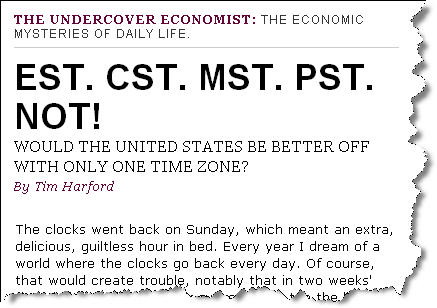
I just read an interesting article in Slate discussing the notion of moving the continental US to a single time zone.  The article also suggests doing away with Daylight Savings Time.

This is interesting, and why shouldn't we do it? After all, China should have 5 time zones and they use a single zone, so wouldn't it work for us?

The article talks about TV schedule impacts, etc. but I've thought of a few other interesting challenges with this notion:

  • Whose time zone would we pick?  You just think political battles are messy now, wait til you have the populous states of California and New York battling it out over time zones!
  • How would this impact air travel?  I travel a lot and rely on the time zone differences across the US to get meetings in on the east coast and still make it home before everyone's asleep in Oregon.  I also use redeye flights sometimes and count on my ability to "play the zones" to fit more in and minimize time away from home.  This would put a crimp in that, for sure.

What do you think?  I don't think this'll happen any time soon (if ever) but it's fun to ponder.  So click on the image below to see the full text and ponder away...

I'd much rather the US move to the metric system.

Timezones_1

Read More

A couple of interesting GTD tools / resources

After posting on my GTD Odyssey, I found out about some other great resources for the curious.

Ready-Set-Do Tutorial video

In Part 4 of my Odyssey, I mentioned Ready-Set-Do!, which is a set of tools to support a strong GTD workflow on the Mac. I don't use a Mac, but was very impressed by some of the videos Todd (creator of Ready-Set-Do!) has assembled. In particular, the section of the Tutorial on "Juggling the GTD Workflow" really captures the essence.

I asked him to post the video as a standalone link, and he gladly obliged. Go check out the Ready-Set-Do! Tutorial video, at this link. Then, if you're a Mac user and want to use this awesome software, go to the main site.

tedium

The next cool find is called "tedium" and I found out about it from Adrian McEwan at MCQN Ltd. This is a web-based productivity management system that isn't GTD-specific, but ties nicely with the "simple tools to manage complex lives" philosophy. You can go through the demo of its capabilities and give it a test drive, and decide whether you want to subscribe to the services (there is a time-limited trial available).

I really like this one, but am too "offline" to use it as a primary system these days. I'd love to see something like this evolve into a blended online/offline application.

Adrian would love to get input on this, as well as feedback on why you would/wouldn't use it for daily life - go check it out.

Scrybe

It isn't production-ready yet, but the video on the Scrybe homepage is awesome. This looks like it could really rock the world of productivity in a platform-neutral way. One reason I am intrigued: it seems to blend Web 2.0 and offline functionality in an impressive way. Go check out the video and see if you don't start drooling, too!

Keep those cards 'n' letters coming, folks!

What's inside your stone?

I spent some time in Calgary and Pittsburgh this week, which afforded me some good plane time to chew through a new book I just received. Short review: Wow - you should check this one out!

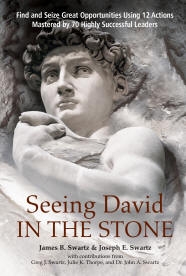
The book is "Seeing David In The Stone," by James B. Swartz and Joseph E. Swartz, and it is about how we can learn to be more effective at unlocking our opportunities and shaping our futures by studying the methods of some of the great geniuses of the past.

I think this is a great companion to Dick Richards' "Is Your Genius At Work?" which I reviewed about a year ago. Dick's book is about how to identify your personal, unique strengths, and this book provides some tremendous techniques to help you apply your genius in different ways to maximize the impact of that genius.

The book's an easy, enjoyable read and is presented as a sort of conversation between a learner and his mentor. It's a captivating story, laced with specific case studies of people like Einstein, Marie Curie, Michelangelo, Edison, Da Vinci, and a 65 other masters of their craft. A lot of the stories are from long-ago history, but you'll be pleased to find some spotlights of recent breakthrough successes, as well.

What's so special about this book?

I occasionally allude to some of the IT process consulting work I'm involved in as part of my 'day job,' but it's been more than just consulting. I've been privileged to be part of a groundbreaking research effort to observe and catalog the best known methods of high-performing IT organizations around the world. This research has led to some revolutionary, prescriptive guidance that enables any IT organization to benefit from the things the high performers have Darwinistically evolved on their own (shorten the learning curve, if you will).

"Seeing David In The Stone" has a similar feel to this IT research, since it catalogs and analyzes the practices of some of the most influential people in history. The book then provides a clear, ordered, 12-step process to help you tap into the best known methods of these highly successful leaders.

The practices are context- and industry-independent, and are well explained in the book. I read the book over the course of two flights this week, and found myself getting energized and excited about applying the principles in the book. Some of the concepts "clicked" so hard for me that I could literally feel the connection in my head.

I highly recommend this book for anyone who's involved in a creative pursuit, or who has the spirit of a learner, entrepreneur, or inventor.

Read More

Fresh Gear: My favorite presentation remote

I do at least 10 live presentations a month, and I love my presentation remote. I've been using the Logitech 2.4GHz Cordless Presenter for about a year now. Having used lots of other remotes that left me dissatisfied for one reason or another, this one has been perfect. When I was shopping for it last year, I created a list of selection criteria:

  • Compact size
  • Easy operation "by touch" (i.e. simple enough to operate without looking at it)
  • Must use standard batteries (not button-cell or other batteries that are tricky to find while traveling)
  • Must have an on/off switch to prevent accidental draining of the battery
  • Must be plug & play in Windows XP

The Logitech Cordless Presenter exceeds this short list of "must haves." It is small, easy to operate "by touch", uses two AAA batteries, has an on/off switch, and has built-in driver support in Windows XP. It also has additional beneficial aspects (lagniappe, where I come from):

  • It has a built-in countdown timer that you can set to help keep you on your time schedule. It provides a silent, vibrating reminder when you have 5, 2, and 0 minutes left.
  • It has a built-in laser pointer.
  • It is quite comfortable and natural to hold while presenting.
  • The controls provide forward and backward slide navigation buttons, as well as a button to blank the screen.
  • The range is very good - I've operated the controls from 45 feet away with no problems.
  • The remote includes a USB receiver that actually plugs back into the remote itself for easy storage - and you won't lose it this way.
  • It includes a neoprene, custom-fit storage sleeve to protect it during travel.

If you do much presenting, I think this is the remote you've gotta have.