Genuine Curiosity

Author Dwayne Melancon is always on the lookout for new things to learn. An ecclectic collection of postings on personal productivity, travel, good books, gadgets, leadership & management, and many other things.


NextAction! for Blackberry - a fresh look

I have been spending time with version 2 of S4BB's NextAction! product, which is a Blackberry add-on designed to help manage your projects and next actions on your Blackberry - and is specifically intended for use with the Getting Things Done methodology. This product has been around for a while, but I felt version 1 was clunky with limited functionality, and significant usability challenges. In contrast, the new version 2 is a huge improvement, and I am now comfortable recommending it here.

NextAction! is add-on software designed specifically for Blackberry handhelds, and it adds a new dimension to your Blackberry task management. It syncs seamlessly with the tasks on your desktop, works with Windows, Mac, and Blackberry Enterprise Server (BES), and supports desktop apps like Microsoft Outlook, Lotus Notes, Act!, Novell Groupwise, iCal, Entourage, etc.

Better tasks for Blackberry
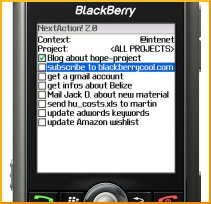
Why do you need a better way to manage tasks on Blackberry? The Blackberry's built-in task application is woefully inadequate. It does a poor job with categories, has a cumbersome interface, and offers very little in the way of filtering.

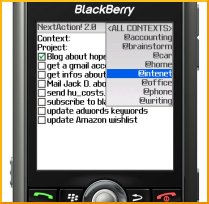
NextAction provides a clean way of viewing and organizing your tasks by Context (category) and Project (Contexts are automatically synched with the Categories you create on your desktop, while Projects need to be created within NextAction!). You can change your view with one click by selecting a new Context (see the view at right).

You can also create new next actions from within the NextAction! application, and mark existing tasks as complete. Furthermore, you hide completed tasks in your view so they get out of your sight when you're done with them.

You can try it risk free with the free trial version of NextAction! -- if you're a Blackberry user, and a GTD follower, I recommend giving it a spin to see if it will work for you.

Pros:

  • NextAction! isell-suited for use with GTD
  • NextAction is much better than the Blackberry's native Task application
  • Excellent support for Contexts / Categories
  • Coexists peacefully with built-in Blackberry applications
  • Excellent integration with Desktop applications and BES
  • Nice keyboard shortcuts to make managing next actions easier
  • Available in English, German, and Chinese language versions
  • Supports latest Blackberry models (Blackberry Pearl, 8800, Curve, etc.)
  • Nice, long, free trial so you can check it out before you buy

Cons:

  • Pricey - $40-$50 depending on where you purchase it (upgrades from v1 are $20)
  • Limited sorting capability - can't sort by due date or priority
  • Only supports Blackberry devices


Related items

Read More

Buy remarkable book, get remarkable deal, become remarkable leader

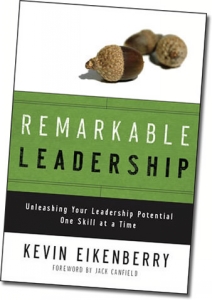
Ok, so I haven't read this book yet, but I can't resist passing on an awesome deal: when you buy Kevin Eikenberry's new book, Remarkable Leadership, you get a fantastic bunch of bonuses that make it worth its weight in gold.   To order, click one of the links above, scroll down to see the bonuses, and look for the ordering links near the end of the page - you need to order through one of those links get the bonuses.

In addition to the free stuff, there are a couple of other reasons I'm recommending this before I read it:

  1. I've been following Kevin's blog for quite a while, and I think he has some awesome leadership kung fu
  2. Kevin's trying to concentrate the buying of this book right away so he can become an Amazon best seller

On a related note, Kevin and his team also offer the Remarkable Leadership Learning System, which is a powerful program to help you become a better leader by guiding you through focused work on a specific topic each month. Check it out if you're looking for a leadership breakthrough.

By the way - I will be reviewing this book in the future - after I get my own copy!


Related items:

Read More

An interesting new GTD application

I've just been reading up on an interesting approach to tackling the Getting Things Done (GTD) - it's called "Wrike" and it looks very intriguing. They say they will save you 30 minutes a day if you use their tools properly.

Wrike is a web-based application, so you'll need internet access to use it, but that also means you can use it from anywhere. You get a simple "dashboard" to create and manage tasks, as well as reporting on future and completed tasks and projects. You can use tags and create heirarchical relationships to make it easier to group your activities.

Of course, Wrike wasn't specifically written for Getting Things Done, but they've recently posted great guidelines for how to use Wrike for GTD.

One of the more interesting features is the ability to create new tasks, projects, and delegation assignments via email. You compose an email to Wrike and the system uses that email to drive the task:

"Create a message with a task to one of your friends. Put wrike@wrike.com in the CC field and add the due date [yyyy-mm-dd] in the subject line. The template due date is currently shown as tomorrow. Then hit the send button.

Within next several minutes both of you will get an invitation from the system. You and your friend will be able to keep track of this task together. If the task is not marked completed by the due date, Wrike will remind both of you about it."

According to their documentation, you don't need to be online to update and manage these tasks - you receive email notifications, and can update the rest of your team via email through Wrike. Hard to visualize? Click here to see a video demo of Wrike in action.

They offer a free version and a Pro version ($5 per month) for individuals, as well as several flavors of team-oriented packages. For more info on pricing or to sign up, check out Wrike's pricing page.

I haven't really used this yet, since I tend to be more of an "offline" or Outlook-centric kind of person for GTD, but would love to hear your stories if you decide to use it. The free version should make it a safe experiment for the curious and adventurous souls among you.

Read More

Guten tags

Ariane of Neat & Simple Living tagged me in yet another "5 things" chain. This time, it's about the 5 most useful sites you use to perform your work.

That is a tough one, but here are 5 of my top sites (maybe not "the Top 5" but 5 good ones):

  1. Google  --  OK, so I'm hooked. I use it for Search, for News, Financial research and Alerts.
  2. Amazon.com  --  I am an Amazon Prime customer and, as a heavy reader, they make sure I see the UPS driver a lot.
  3. LinkedIn   --  I am in a business development / networking role, and LinkedIn helps me make new connections by leveraging my existing contacts. Pretty cool for business networking.
  4. SeatGuru   --  I've reviewed SeatGuru in the past - it is the resource to figure out how good your seats are before you fly.
  5. Digg  --  A unique lens on the news of the world. Think of it as News with community-driven editorial overlay or filter. The only categories I watch are Technology and World & Business

Now, I tag 5 more.

If you're tagged, post your five with a Trackback to me, and pass on the favor.

Read More

Voice mails of mystery

I leave and receive lots of voice mail messages. One of my pet peeves: voice mails of mystery. These are cryptic messages in which the caller doesn't give me enough information. You know the type - a name and a phone number, with no other context for why they are calling. Is this a sales call? A friend of a friend trying to connect with me? A wrong number? If I can't tell, I typically delete them.

These types of messages have made me more conscious of the content of the messages I leave for others. I try to follow this general recipe for voice mails I leave:

  1. State who I am and where I am from
  2. State why I am calling
    1. High level - not too much detail, but enough to get their attention
    2. Bonus: a punchy point about what I can do for you, or other "What's in it for you?" points
  3. Provide a bit of context (how I found your name, any time urgency, any drivers you may care about - such as whether this is customer-related, etc.)
  4. Provide information on how to reach me - both by phone and email - for best results, say them clearly and say them twice

I also find it useful to say something like, "If you're not the right contact, I'd really appreciate your help in getting to the right person."

All of this can be completed in 20-30 seconds. If it takes you longer than that, practice condensing you point and key messages until you can do it within 30 seconds consistently.

And smile - it really helps. I also suggest leaving yourself a voice mail as if you were trying to get your own attention and see if you'd call yourself back. Try to be objective when you audit your own message.

Read More